
How to Make a Video with YouTube Clips and Go Viral
Ever feel like you're on a content treadmill, constantly struggling to churn out enough short-form videos? The solution might not be filming more, but rather looking at YouTube in a whole new way. It’s not just for watching—it's a massive, ever-growing library of footage you can use to build amazing videos without ever touching a camera.
This flips the whole creation process on its head. Instead of starting from a blank slate, you're starting with an almost endless supply of high-quality visuals. Your job shifts from being a director to a curator and storyteller, piecing together existing clips to create something entirely new and compelling.
The Untapped Goldmine of YouTube Clips for Viral Content
This method isn’t just a shortcut; it’s a strategic advantage for creators and brands. Once you learn how to make a video with YouTube clips, you unlock some serious potential:
- Move at Lightning Speed: Forget spending hours or days on a single video. We’re talking about cutting production time down to minutes.
- Post More, Grow Faster: A consistent posting schedule is what the algorithms crave. This makes it easy to keep your audience hooked.
- Test New Ideas Freely: Want to dip your toes into a new niche? Now you can experiment with different topics and styles without the high cost of original production.
- Tell Bigger Stories: Gain access to visuals you could never capture on your own, from breathtaking drone shots to rare historical footage.
Of course, this isn't about just ripping off other people's work. It's a process that has to be done responsibly. Understanding the legal and ethical side of using content is crucial. The goal is to build something new while respecting the original creators—and thankfully, there are tools and guidelines that make this simpler than ever.
The key is to be a creator, not just a compiler. The goal is to add your unique perspective, commentary, or narrative to transform the source material into something entirely fresh and valuable for your audience.
The Rise of AI-Powered Remixing
Modern AI tools are an absolute game-changer here. Platforms like ClipShort empower anyone, regardless of editing experience, to turn a folder of clips into a polished, professional video. This goes way beyond just stitching clips together. We're talking about crafting a full story with AI-generated voiceovers, dynamic captions, and perfectly synced music.
The hunger for this type of content is massive. When YouTube Shorts launched back in 2021, it saw 50 million uploads. Fast forward to 2024, and creators have pumped out over 910 million Shorts. Daily views have rocketed past 200 billion, with a total view count north of 5 trillion. The data is clear: people love short, remixed videos. If you want to see the full picture, dive into the incredible growth of YouTube Shorts statistics.
Ready to tap into that goldmine? Let's break down exactly how to do it.
Finding and Legally Sourcing YouTube Clips
Before you can even think about editing, you need your raw materials—the clips. This is easily the most critical part of the process, because just grabbing any video you find is a surefire way to get copyright strikes or even have your channel taken down.
But don’t let that scare you. There's a massive, ever-growing library of content out there that you can use ethically and legally. The trick is knowing where to look and understanding the rules of the road. Let's break down the two main paths for sourcing your clips without getting into trouble.
Using Creative Commons Content
The safest and most straightforward route is to use content that creators have already given you permission to use. This is done through a Creative Commons (CC) license. When a creator uploads their video with a CC license, they're essentially saying, "Hey, feel free to use my work, just follow a few simple rules."
YouTube makes finding these clips a breeze. Here’s how you do it:
- Start with a search: Go to YouTube and type your topic into the search bar.
- Open the filters: Just below the search bar, click on the "Filters" button.
- Select "Creative Commons": Look under the "Features" column and click on it.
Just like that, your search results will refresh to show only videos licensed for reuse. This takes all the guesswork out of the equation. Just be aware that most CC licenses require you to credit the original creator in your video description, so always double-check the specific license terms.
Demystifying Fair Use
So, what about the millions of other videos on YouTube that aren't Creative Commons? This is where the concept of Fair Use comes into play. It's a legal principle that lets you use copyrighted material without permission, but it’s not a free-for-all. It's a bit of a gray area.
Fair Use isn't a right; it's a defense you can use if someone challenges your content. For your video to qualify, it has to be transformative. This is the magic word. It means you aren't just re-uploading someone else's work—you’re adding something new, creating a whole new piece of content with a different purpose.
Key Takeaway: Your Fair Use claim is strongest when you use short clips to support a larger, original point. The focus should always be on your commentary, analysis, or story, with the clips acting as evidence or illustration.
Here are a few classic examples that generally fall under Fair Use:
- Commentary & Criticism: Reviewing a movie trailer and pausing to break down specific scenes.
- Parody: Making a funny spoof of a famous music video.
- News Reporting: Using a clip from a press conference to report on it.
- Education: Showing a quick segment from a documentary to explain a historical event.
The more you change the original context and inject your own voice, the safer you are. Using a tool like ClipShort to weave clips into your own script with a unique voiceover and captions is a perfect example of transformative work. You’re not just reposting; you're creating something entirely new.
To make it even clearer, here’s a quick guide to understanding the different legal sources for your clips.
Legal Sources for YouTube Clips
| Source Type | What It Means | Best For | Risk Level |
|---|---|---|---|
| Creative Commons (CC) | The creator has given explicit permission for reuse, usually with an attribution requirement. | Background footage, montages, and general visuals where you don't need a specific clip. | Very Low |
| Public Domain | The copyright has expired, and the work is free for anyone to use without restriction. | Historical footage, old government films, and classic movies. | None |
| Fair Use | You're using a small portion of copyrighted material for commentary, criticism, or education. | Reaction videos, reviews, analysis, and educational content. | Medium |
| Copyrighted (No Use) | You're re-uploading someone's entire video or a large portion with no changes. | Never. This is a direct path to copyright strikes. | Very High |
Stick to the first three, and you'll be building your channel on a solid foundation.
Practical Sourcing Strategies
Knowing the rules is one thing, but actually finding great clips efficiently is another. The reality is, creating videos from existing YouTube clips isn't just a clever hack—it’s a data-backed strategy for growth. Over 70% of channels that upload monthly are now posting Shorts, and clip-heavy categories like video games (469k uploads in H1 2023) and Movies & TV (439k uploads) are leading the charge.
You can even tap into global markets. With US viewers driving 19.4% of traffic and India leading uploads at 23.6%, creating content with localized voiceovers can dramatically expand your reach. For a deeper dive, check out the full 2025 YouTube Shorts statistics.
When you're hunting for clips, focus on channels in your niche that are already "remix-friendly"—think gaming, commentary, or news channels. These creators usually understand that their content will be discussed and shared.
Always go for shorter clips. A 5-10 second segment is much easier to defend under Fair Use than a full 2-minute scene. Remember, your video is the star; the clips are just the supporting cast. And since great audio is just as important as great visuals, it’s always a good idea to learn how to add music to a video online to set the right mood and keep your viewers hooked.
Automating Your Video Creation Workflow
Alright, you've figured out how to legally source your YouTube clips. Now for the fun part: stitching them together into a video that stops the scroll. You could spend hours wrestling with a traditional video editor, messing with timelines and keyframes. Or, you can shrink that entire process down to just a few minutes.
This is where the real power of making videos from YouTube clips comes alive. It's about moving at the speed of your ideas, not getting bogged down by technical stuff.
Crafting Your Narrative Foundation
Every great short-form video, even a 30-second one, needs a story. It doesn't have to be some epic screenplay—a few bullet points mapping out your core message is often all it takes. Think of it as a tiny narrative arc.
If you're staring at a blank page, AI can be an incredible creative partner. Tools like ClipShort have built-in script generators that can take a simple idea, like "explain the history of ancient Rome in 45 seconds," and spit out a punchy, engaging script. It gives you a solid foundation you can then tweak and make your own.
Pro Tip: Your script needs a hook, a middle, and a conclusion. The first 3-5 seconds are everything—they have to grab attention. The middle delivers the value, and the end should have a clear takeaway or call to action.
Once your script feels right, you're ready to bring it to life.
Transforming Your Script into a Video with AI
This is where the automation really kicks in. With a platform built for this workflow, you can turn that text into a finished video without ever touching a complex editing timeline. It's surprisingly simple and built for speed.
First, you need to prep your source material. This visual flow breaks it down:
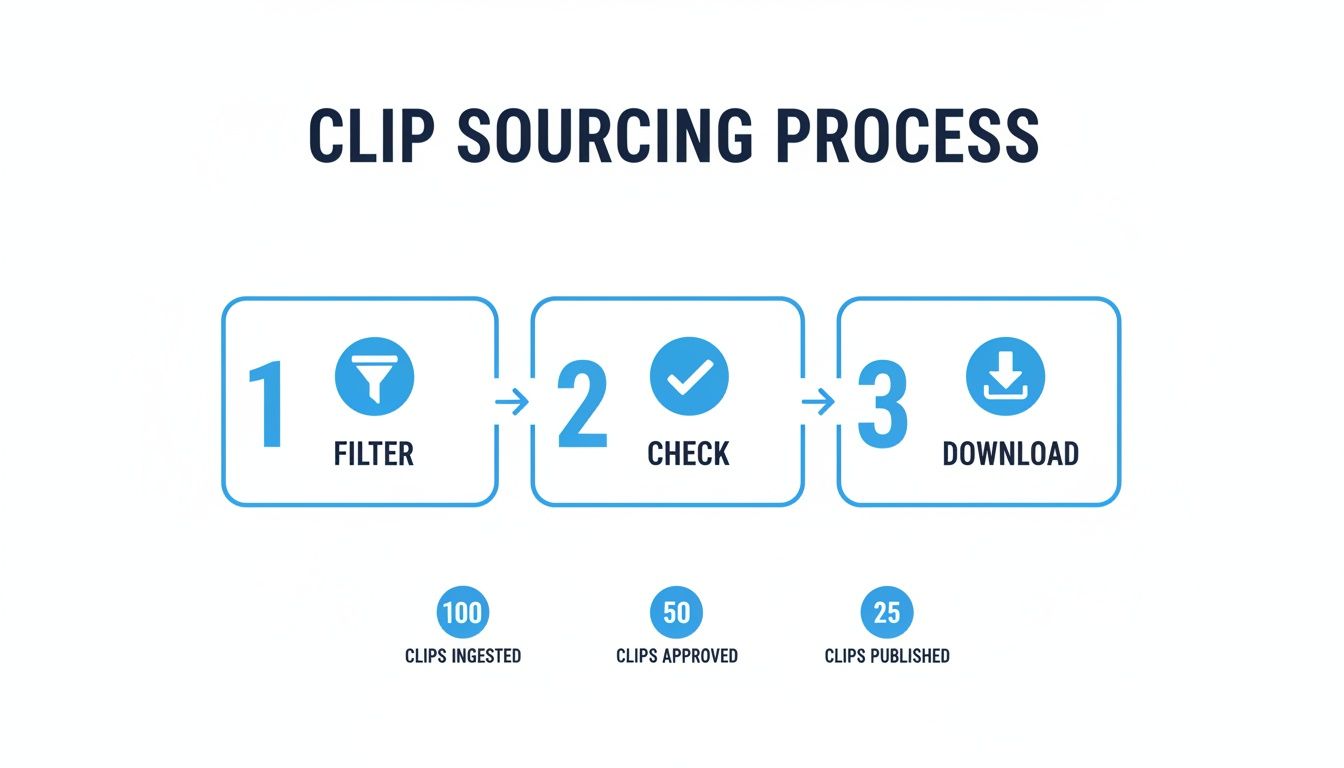
This quick Filter, Check, and Download process gets your clips ready for the AI to do its thing.
The whole idea is to pair your script with the right visuals. You'll upload the YouTube clips you’ve gathered to serve as the B-roll for your story. From there, the AI intelligently syncs those visuals with your script, making the initial scene selections for you. It’s like having an assistant editor who does the first pass instantly.
Adding the Layers of Polish
A good video is more than just clips and a script; it’s an experience. This is where automation tools truly shine, letting you add those crucial layers that boost viewer retention without all the manual effort.
-
Select an AI Voiceover: Forget setting up a mic. Modern AI voices are shockingly realistic. You can pick a voice based on the exact tone you need (authoritative, friendly, energetic) and language. With over 50 languages and multiple accents available, you can create content for specific global audiences on the fly.
-
Add Dynamic Captions: Captions aren't just for accessibility anymore—they're a must-have for engagement. So many people watch with the sound off. Animated, stylized captions that highlight keywords keep viewers locked in. Look for tools that let you customize templates and add motion to make your text pop.
-
Choose Background Music: The right track sets the mood and drives the video's pace. Most platforms have libraries of royalty-free music you can add with one click. The software will even automatically lower the music volume during the voiceover (a process called audio ducking) so everything sounds perfectly mixed.
A project that might take three hours in a traditional editor can seriously be done in under ten minutes this way. If you want to dive deeper into this workflow, you can learn more about the power of automatic video editing and see how it's completely changing the game.
This isn't just about saving time. It's a strategic advantage. It lets you test more ideas, post more often, and grow your channel faster than you ever thought possible.
Polishing Your Compilation for Maximum Impact
So, you've used an automated tool to stitch together the basic framework of your video. Now comes the fun part: adding the human touch. This is where you transform a simple collection of clips into a compelling story that people will want to watch over and over.
The goal here is to go beyond just stringing clips together. We're crafting an experience. Think of it like this: even in a video that's less than 60 seconds, you need a narrative arc. A hook to grab them, rising action to build interest, a climax, and a satisfying payoff. Arranging your clips to build that momentum is what stops the scroll.
Crafting a Narrative Through Pacing and Cuts
Those first three seconds are everything. You have to earn the viewer's attention immediately, so start with your most visually striking or emotionally charged clip. That's your hook.
From there, it's all about rhythm. You can build tension with slightly longer, more deliberate clips, then unleash a burst of energy with a series of rapid-fire cuts to emphasize a point. It's this intentional pacing that guides the viewer's emotional journey. For example, if you're explaining something complex, you might start slow and then hit them with quick-cut examples to drive the point home. This is the key to making a video with YouTube clips feel dynamic, not like a boring slideshow.
Enhancing the Story with Sound and Transitions
Sound design is your secret weapon. I'm not just talking about background music; I mean strategic sound effects that make key moments pop. A subtle swoosh for a quick transition, a light ding to highlight on-screen text, or a dramatic sound for a big reveal. These small audio details signal quality.
Transitions are just as important. An automated tool might give you basic cuts, but you can do better.
- Jump Cuts: These are perfect for creating a fast-paced, high-energy vibe. Think montages or showing quick progress.
- Smooth Transitions: Fades or dissolves give the viewer a moment to breathe, signaling a change in topic or time.
- Whip Pans: A fast, motion-blurred transition is a great way to connect two different scenes while keeping the energy high.
Your goal is to make the edits invisible. A good transition shouldn't be noticed; it should just feel right, carrying the viewer smoothly from one idea to the next without any jarring interruptions.
Achieving Visual Consistency Across Clips
One of the biggest hurdles when you make a video with YouTube clips is the source material itself. You're pulling from dozens of different creators, which means lighting, color, and quality will be all over the place. Visual cohesion is a must.
A simple but powerful trick is to apply a consistent filter or color adjustment (often called a LUT) across all your clips. This instantly makes them feel like they belong together. You don't have to be a professional colorist—most editing tools, including platforms like ClipShort, have presets that can unify your visuals with one click.
For more control, you can tweak basic settings like brightness, contrast, and saturation. The goal isn't to make every clip look identical but to create a consistent mood.
When you're ready to assemble your best segments, leveraging specialized AI Highlight Reel Creator Tools can be a massive timesaver. They often have features built-in to help with pacing and visual consistency. If you want to dive deeper into these techniques, check out our complete guide to YouTube Shorts editing. This human-guided refinement is what separates a forgettable compilation from a video that could go viral.
Optimizing Your Video for Platform Growth
Creating a killer video is just the first half of the battle. The real challenge—and where the growth happens—is making sure the right people actually see it.
Every short-form platform has its own personality. TikTok, Instagram Reels, and YouTube Shorts all run on different algorithms and cater to slightly different audience expectations. If you just spray and pray with the same exact video everywhere, you're leaving views on the table. A one-size-fits-all approach is a recipe for mediocrity.
Your job is to feed the algorithm every possible signal that your content is high-value. This starts with the technical details but goes all the way to the captions, sounds, and timing you choose. Think of it like learning to speak the native language of each platform.
Mastering Your Export Settings
Before you even start thinking about hashtags or viral audio, you have to get the technical foundation right. A blurry, poorly formatted video is an instant scroll-past. No one sticks around for low-quality visuals.
Luckily, the magic formula for all three major platforms is pretty straightforward:
- Aspect Ratio: It's 9:16, always. This vertical format is non-negotiable. It fills the entire phone screen and makes your video feel immersive and native.
- Resolution: Stick to 1080x1920 pixels. This gives you that crisp, clean HD quality without creating a massive file that’s a pain to upload.
- Frame Rate: Export at 30 or 60 frames per second (fps). I lean towards 60 fps for anything with a lot of motion because it just looks smoother, but 30 fps is a solid, reliable standard.
Nailing these settings is your ticket to entry. It’s the baseline for everything else you do to grow your channel.
Tailoring Your Content for Each Platform
With a perfectly rendered video file in hand, it’s time to optimize it for discovery. This is where you bridge the gap between just making a video and actually growing an audience.
Your caption is your first line of attack. Kick it off with a strong hook—ask a provocative question, make a bold claim, or say something that piques curiosity. The caption should add another layer of context or continue the story, not just rehash what’s already happening on screen.
Next up: hashtags. Don't just throw in a dozen random tags. Do some research and use a smart mix. Include a few broad, high-volume tags for reach, but also add some niche-specific ones to attract your ideal, hyper-targeted viewer. For TikTok and Instagram, jumping on trending audio can be like pouring gasoline on a fire—it gives your video a huge initial push.
Of course, understanding the nuances of how algorithms work, especially on YouTube, is a game-changer. The way AI search surfaces content is a deep topic, and I found a great breakdown that covers everything YouTube taught me about AI search. It’s worth a read.
The key is to make your content feel like it belongs on the platform. A video that looks and feels like a TikTok will almost always do better on TikTok. The same goes for Reels and Shorts.
Finally, you need to tell people what to do next with a clear call-to-action (CTA). It's not pushy; it's guidance. Ask them to drop their thoughts in the comments, hit follow for part two, or share the video with a friend who needs to see it. This directly fuels the engagement metrics that tell the algorithm your content is a winner.
Let's wrap this up with a quick-glance checklist. Before you hit "post" on any platform, run through these steps. It only takes a minute, but it can make a massive difference in your video's performance.
Short-Form Platform Posting Checklist
| Optimization Step | YouTube Shorts | Instagram Reels | TikTok |
|---|---|---|---|
| Title/Caption | Optimize title for search with keywords. Keep it concise. | Write a compelling hook. Add value in the caption. | Hook-focused first line. Keep it short and punchy. |
| Hashtags | Use 3-5 relevant, searchable tags in the description. | Use a mix of large, niche, and branded hashtags (5-15). | Use 3-5 high-relevance tags, including trending ones. |
| Audio | Can use Shorts library, but original audio can rank in search. | Trending audio is crucial for initial reach. | Trending audio is king. It's a primary discovery driver. |
| Call-to-Action | "Subscribe," "Check the link in my channel bio." | "Follow," "Share to your story," "Save for later." | "Follow," "Comment your thoughts," "Check my profile link." |
| Thumbnail | Choose a custom thumbnail from the video frames. | Select a cover frame or upload a custom cover image. | Select a cover frame and add text overlay. |
This checklist isn't meant to be rigid, but it's a fantastic starting point. As you post more, you'll develop your own intuition for what works best for your specific audience on each platform.
Frequently Asked Questions About Using YouTube Clips
Jumping into content creation, especially when you’re making a video with YouTube clips, always brings up a few important questions. It’s smart to be cautious here—knowing the rules doesn’t just protect you, it gives you the confidence to create amazing stuff. Let's tackle some of the most common gray areas.
Is It Legal to Use Clips from Other YouTube Videos?
This is the big one, and the answer isn't a simple yes or no. The short answer is: it can be, but you have to do it right.
Your safest, most straightforward path is to use clips licensed under Creative Commons (CC). This means the original creator has already granted permission for people to reuse their work, usually just asking for attribution in your description. Easy peasy.
The other route is Fair Use. This legal doctrine can protect you if you’re transforming the original clip for a new purpose, like commentary, criticism, education, or a parody. But here's the catch: Fair Use is a legal defense, not a free pass. Just grabbing big chunks of someone's video and re-uploading them with a new title is a surefire way to get a copyright strike.
The core of a strong Fair Use argument is transformation. When you use clips to back up your own original script and voiceover, you're building a brand-new narrative. You're creating something new, not just reposting someone else's work.
How Long Should My Compilation Be for the Best Results?
For short-form video on platforms like TikTok, Instagram Reels, and YouTube Shorts, the sweet spot is generally between 20 and 60 seconds. Your entire goal is to keep people watching until the very end. You need enough time to hook them and tell a quick story, but not so long that their thumb gets itchy to scroll.
Many of the most viral videos land right around the 50-60 second mark, which gives them enough room to build up a little suspense or deliver a punchline.
But honestly, the first 3-5 seconds are what make or break your video. This is your hook. You have to put your most powerful statement, most intriguing question, or most eye-catching clip right at the very beginning to stop the scroll.
Can I Monetize Videos Made from Other YouTube Clips?
Yes, you absolutely can, but it all comes down to the value you add. If your channel is part of the YouTube Partner Program, you can earn money from videos that use third-party clips, but only if your work is genuinely transformative.
Simply mashing together your favorite clips with some background music is a fast track to getting flagged for "reused content" and demonetized. YouTube wants to reward originality, not just curation.
To successfully monetize, you have to bring something significant to the table. This means adding your own creative layer, such as:
- Unique commentary that offers a fresh perspective or deeper insight.
- An original script that uses the clips to tell a completely new story.
- Educational analysis that breaks down what's happening in the clips.
- Heavy, creative editing that fundamentally changes the feel and context of the source material.
The more of your own voice, ideas, and storytelling you inject, the stronger your case for monetization becomes. That's what makes the final video yours—and what makes it worth monetizing.
Ready to stop wrestling with complicated editors and start creating scroll-stopping videos in minutes? ClipShort uses AI to turn your script and sourced clips into polished, professional videos with voiceovers, captions, and music, all in just a few clicks. Join thousands of creators who are scaling their content production and growing their channels faster than ever. Start creating with ClipShort today!