
Go Viral Using an AI Video Generator for TikTok
An AI video generator is your secret weapon for creating high-quality, faceless TikToks at scale. It’s how you automate everything from the script to the final visuals. With a tool like ClipShort, you can consistently pump out viral-style videos without ever stepping in front of a camera, letting you go toe-to-toe with the platform's relentless algorithm.
The New Wave of Faceless TikTok Content
Welcome to the new era of TikTok, where you don’t need to be on camera to dominate the For You Page. We're seeing a massive shift right now. Faceless content—everything from deep dives into historical events to quick product explainers—is absolutely blowing up. This is a golden opportunity for creators and brands who want to build an audience without the pressure of traditional filming.
The biggest hurdle on TikTok? The algorithm’s insatiable appetite for new, consistent content. For a solo creator or a small team, trying to keep up by filming and editing everything by hand is a fast track to burnout. Even a simple video can eat up hours, making a daily posting schedule feel like a fantasy.
This is exactly where an AI video generator for TikTok changes the entire game.
Why AI Is the Ultimate Faceless Content Machine
Look, a tool like ClipShort isn’t just about making videos a little faster—it’s about building a scalable content production line. It completely removes the usual roadblocks: you don't need fancy cameras, complicated editing software, or the confidence to be on-screen. Instead of burning hours behind a lens, you can put all your energy into the story you want to tell.
The whole process gets boiled down to three simple stages: writing the script, letting the AI generate the video, and hitting upload.
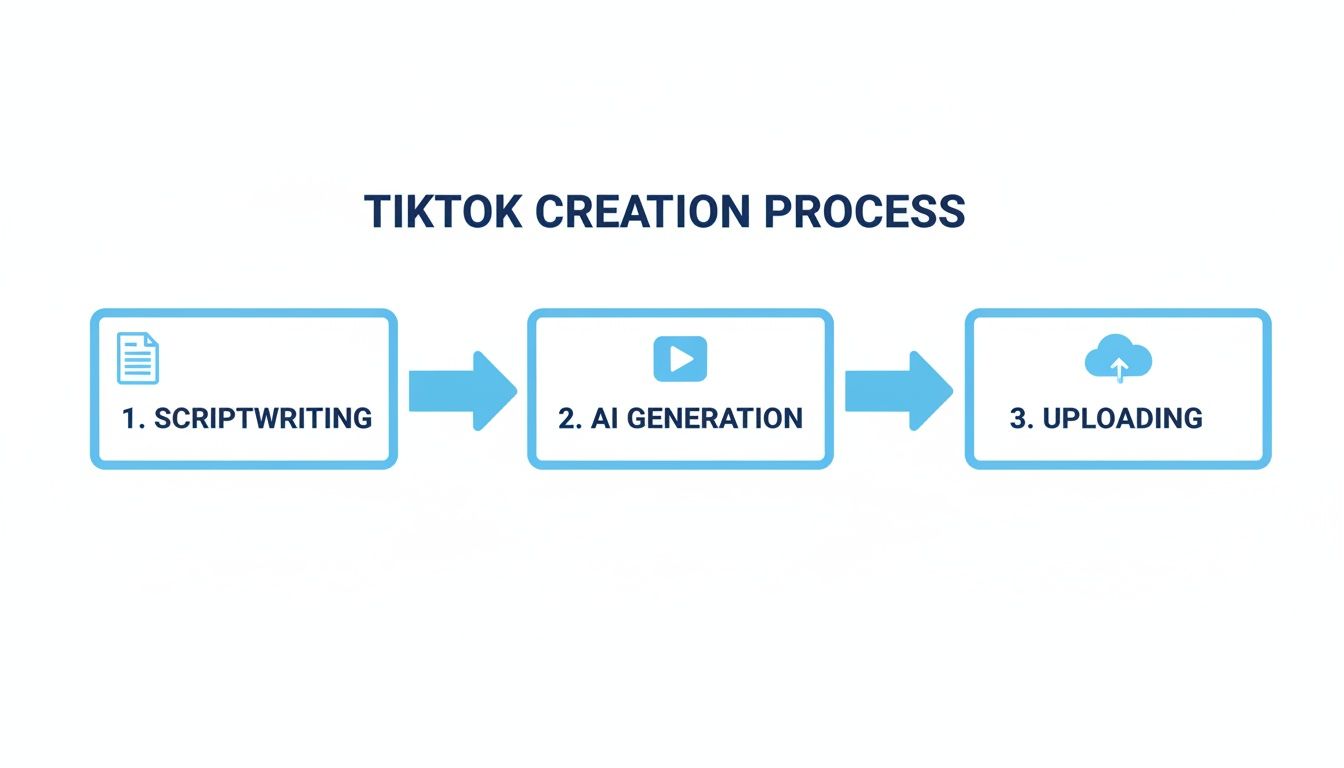
This super-efficient workflow means you can test new ideas on the fly, pivot your strategy without losing momentum, and fill your niche with top-notch content. You can build an entire channel with nothing more than a laptop.
Let's break down just how different the two approaches are.
Traditional vs AI-Powered TikTok Production
| Metric | Traditional Method (Filming) | AI Video Generator (ClipShort) |
|---|---|---|
| Time Investment | 4-8 hours per video (planning, shooting, editing) | 5-15 minutes per video |
| Cost | $500+ (camera, lighting, mic, software) | Starts at $0 (free plan available) |
| Skill Requirement | High (videography, editing, on-camera presence) | Low (basic writing and idea generation) |
| Output Potential | 1-3 videos per week | 5-10+ videos per day |
The difference is stark. AI doesn’t just speed things up; it completely rewrites the rules of production, making high-volume, high-quality content accessible to anyone.
Competing in a Crowded Space
The amount of content on TikTok is just staggering. Think about it: 23.5 million videos are uploaded every single day. And with the algorithm responsible for 85% of all views, speed and consistency are the keys to getting discovered. For faceless accounts, this intense environment is precisely where AI tools shine. They let you compete with huge creators without getting bogged down in the mechanics of filming.
The real power of AI-driven video is that it levels the playing field. A great idea can become a polished, engaging video in minutes, giving anyone the chance to capture audience attention and grow a following.
Automating the grunt work frees you up to focus on what actually matters: crafting killer stories and figuring out what your audience loves. When you remove the technical headaches, you can spend your time on creative experiments and actually engaging with your community. You can test out a ton of faceless TikTok ideas until you find what sticks.
Ultimately, an AI video generator for TikTok is more than just a production tool. It’s a strategic asset for anyone who's serious about building a successful, burnout-proof channel. It’s how you turn great ideas into a steady stream of content that both the algorithm and your audience will eat up.
Developing Scripts That Stop the Scroll
Every viral TikTok, no matter how simple it looks on the surface, is built on a killer script. It's the hidden framework—the skeleton that gives your video its pacing, structure, and punch. Without a solid narrative, even the most visually stunning video will get swiped away in seconds.
Good news is, you don't have to be a professional screenwriter. An AI video generator for TikTok like ClipShort gives you two killer ways to get a script that hooks viewers from the very first second.
You can either roll up your sleeves and write one yourself using a proven formula, or you can let the AI do the heavy lifting with a simple prompt. Both methods work incredibly well. Your choice just comes down to your niche and how much hands-on control you want over the story.
Crafting a Script with the Hook-Body-CTA Formula
If you're like me and prefer a more hands-on approach, the classic Hook-Body-CTA (Call-to-Action) model is your secret weapon. This structure is perfectly engineered for TikTok's fast-paced environment, where you have maybe 3 seconds—if you're lucky—to grab someone's attention. It's a simple but brutally effective way to structure your thoughts.
Here’s the breakdown:
- The Hook (First 3 Seconds): This is everything. Seriously. Start with a shocking statistic, a controversial opinion, or a problem everyone in your audience has. Your only job here is to stop the scroll and make them wonder, "What's next?"
- The Body (The Meat of the Story): Now you deliver the goods. Keep your sentences short and punchy. Tell your story, explain the concept, or list your facts in a way that’s dead simple to follow. No fluff.
- The CTA (The Final Push): Don't just let the video end. Tell your audience exactly what to do next. "Follow for part 2," "Drop your thoughts in the comments," or "Hit the link in bio"—be direct.
Let's say you run a historical facts channel. A script could look something like this:
Hook: "Did you know the deadliest pirate in history was a woman?"
Body: "Ching Shih commanded a fleet of over 1,800 ships and 80,000 sailors. The Chinese government was so terrified of her they literally had to offer her a full pardon just to get her to retire."
CTA: "Follow for more insane stories from history."
This formula works because it respects the viewer's time while giving them a complete, satisfying story. If you want to go deeper, our guide on how to write a great script for a YouTube video has some next-level techniques that work just as well for TikTok.
Generating a Script with a Simple AI Prompt
Sometimes you have a brilliant idea but just can't find the right words. That's where ClipShort's AI script generator comes in. Instead of staring at a blinking cursor, you just feed the AI a simple prompt and watch it build the entire narrative for you.
The secret to getting a great result? A specific, well-defined prompt.
Think of it like you're briefing a creative partner. The more context and detail you give, the better the final script will be.
Prompting for Success Examples
A vague prompt gets you a vague script. A sharp prompt gets you a viral-ready script.
| Niche | Vague Prompt | Better Prompt |
|---|---|---|
| E-commerce | Write a script about my new coffee mug. | "Write a 30-second TikTok script for our new self-heating coffee mug. Hook with the pain of cold coffee, explain how the tech works in 5 seconds, and end with a CTA to shop now." |
| History Facts | Tell a story about a historical figure. | "Create a 45-second script about the Roman Emperor Caligula making his horse a consul. Focus on the shocking, bizarre details and end with a question to drive comments." |
| Motivation | A script about not giving up. | "Generate an inspiring 25-second script using the analogy of a diamond being formed under pressure. End with a powerful, short CTA like 'Keep going' or 'You've got this.'" |
Using a detailed prompt turns the AI from a basic writer into a strategic storyteller. It will automatically weave in that crucial Hook-Body-CTA structure, saving you a ton of time while making sure your video has the narrative punch to actually perform. Whether you write it yourself or have the AI do it, a strong script is your first—and most important—step to creating a faceless TikTok that people actually watch.
Finding Your Voice and Visual Identity
Alright, you've got a scroll-stopping script. Now it's time for the fun part: building the world around it. This is where you give your video a soul and a distinct personality. Using an AI video generator for TikTok like ClipShort lets you pair the perfect voice with a compelling visual look, which is the magic combo that turns a good idea into something people can't stop watching.
The right vibe doesn't just happen by accident—it’s a very deliberate choice. If you're telling a historical anecdote, you want a voice that sounds wise and maybe a little dramatic. But if you're showcasing a new gadget, you'll need something more upbeat and exciting. The same goes for visuals. A dark, cinematic style is perfect for a true-crime story, but it would feel completely out of place in a lighthearted motivational clip.

These choices are signals. They tell the viewer what to expect and help establish a consistent brand for your faceless channel. Getting this right from the start is how you build a loyal following that knows your content the second they see it.
Selecting the Perfect AI Voiceover
The narrator's voice is the heart and soul of your faceless video. It sets the emotional tone, controls the pacing, and is what ultimately builds a connection with your audience. ClipShort gives you a massive library of shockingly lifelike AI voices in more than 50 languages and accents, so you can find the perfect match for any niche you can dream of.
Just think about your content's goal. Are you telling a creepy story or breaking down a complex business idea? Your voice choice has to reflect that.
- For Storytelling: I've found that a voice with a slightly slower, more deliberate pace and a touch of dramatic flair really pulls viewers in. Think classic documentary narrator for historical facts, or a more hushed, intimate tone for personal stories.
- For Educational Content: Go for a voice that sounds crystal clear, confident, and articulate. You want something that feels authoritative but still approachable—it makes the information easier to trust and absorb.
- For Promotional Videos: You'll want an energetic, friendly, and persuasive voice. The goal is to build excitement and get people to act without sounding like a cheesy, old-school commercial.
Pro Tip: Don't just settle on the first voice you like. Test a few different options with a piece of your script. Pay close attention to how the AI handles the pacing and inflection. The right one just feels more natural and makes your script come alive.
Consistency is also a huge deal. Once you find a voice that clicks with your audience and fits your channel's vibe, stick with it. That voice becomes a core part of your brand identity, making your videos instantly recognizable to your followers.
Choosing a Visual Style That Aligns with Your Niche
Once you've locked in your voice, it's time to decide what your video will actually look like. The visual style is what people see, and it has to work in perfect harmony with the audio. An AI video generator for TikTok handles the heavy lifting of creating the visuals, but you're the creative director—you have to pick the style that fits the message.
ClipShort offers a few distinct visual styles, and each one is dialed in for different kinds of content:
- Cinematic: Think dramatic lighting, deep shadows, and rich, moody colors. This style is perfect for creating a serious or epic feeling, making it a go-to for historical deep-dives, true crime, or powerful motivational clips.
- Anime: With its super vibrant colors and expressive characters, the anime style is a fantastic choice for engaging storytelling. It's great at conveying big emotions and works well for fictional narratives or any content aimed at a younger audience.
- Realistic: If you're doing product showcases, tutorials, or anything informational, a realistic style adds a layer of authenticity. It generates visuals that look closer to actual photos or footage, which is incredibly effective for building credibility.
- Comic: This style gives you bold outlines and a cool graphic novel look. It's a great option if you want to add a bit of humor or break down complicated subjects in a way that's visually interesting and easy to follow.
The whole point is to create a seamless experience where the sound and the visuals are telling the same story. A video about ancient Rome with a cinematic style and an authoritative voice? Instantly immersive. On the flip side, an anime style with a bubbly voice would be perfect for telling the story of a modern-day startup founder. That synergy is what makes a video feel polished and professional, and it's what keeps people watching all the way to the end.
Boosting Retention with Smart Edits
On TikTok, your video is always one swipe away from being forgotten. I’ve seen it a thousand times—the difference between a viral hit and a total flop often boils down to a few small, strategic edits that make your content impossible to ignore.
These aren't just flashy effects. They're psychological triggers designed to hold a viewer's attention, second by second.
Using an AI video generator for TikTok like ClipShort gives you an incredible toolkit for these retention-based edits. You can easily layer in dynamic elements that keep the viewer's brain hooked, which sends a powerful signal to the algorithm that your video is worth showing to more people. It’s all about making every single moment count.
For faceless videos, the most important element is, without a doubt, the captions. Since there’s no person on screen to connect with, viewers depend on the text to follow along. And trust me, static, boring subtitles just don't cut it anymore.
Master Dynamic Animated Captions
Dynamic captions are the ones that move, pop, and change color right in sync with the voiceover. You've probably seen this "Alex Hormozi style" all over your feed. It’s ridiculously effective because it gives the eyes something new to focus on every couple of seconds, killing off visual boredom and keeping viewers locked in.
ClipShort makes this super simple with pre-built animated caption templates. You can tweak them to fit your brand, but the core idea is the same: movement holds attention.
Here’s how to really make them work for you:
- Emphasize Key Words: Set your captions to highlight the most important words with a different color or a quick zoom. This is a simple trick to draw focus to the most powerful parts of your script.
- Get the Timing Right: Don't just slap a full sentence on the screen. Time your captions to appear word-by-word or in short, snappy phrases. This creates a satisfying rhythm that feels perfectly in sync with the speaker.
- Pick a Readable Style: Being creative is great, but if people can't read it, you've already lost. Go for a bold, clean font that pops against your video background. Adding a subtle drop shadow can make a huge difference.
This constant, subtle motion is a powerful psychological hack. It feeds our brain's natural desire for novelty, making it much harder for someone to get bored and swipe away.
Use Emojis for Visual Punctuation
Beyond just text, you need to speak TikTok's native language: emojis. They're a brilliant way to inject personality and create tiny visual breaks that reset a viewer's attention. Think of them as punctuation marks that add instant emotional context.
But don't just plaster them everywhere. Use them with purpose.
| Use Case | Example | Why It Works |
|---|---|---|
| Reinforce an Idea | Talking about money? Add a 💰 or 💸. | It creates a quick, visual link to the topic, making it stick. |
| Break Up Text | Use them at the end of sentences for a pause. | A tiny emoji acts like a visual period, giving the eyes a brief rest. |
| Show Emotion | A shocking fact can be followed by a 🤯. | It tells the audience how to feel, guiding their reaction to the story. |
Emojis are shortcuts for emotion and context. A single, well-placed emoji can convey a feeling much faster than words alone—a must-have for a fast-paced platform like TikTok.
Just be careful not to overdo it. One or two emojis per sentence or key point is plenty. Any more and your video starts to look cluttered and unprofessional, which can distract from your actual message.
Layer in Complementary Background Music
The final piece of the retention puzzle is your audio. The right background music can completely transform the vibe of your video, but the wrong track will just annoy people. Your goal is to find music that supports the mood of the voiceover without fighting it for attention.
When you're picking a track in your AI video generator for TikTok, keep these pointers in mind:
- Match the Vibe: A mysterious story needs a tense, atmospheric track. A motivational video calls for something uplifting and inspiring. It sounds obvious, but so many people get this wrong.
- Keep it Instrumental: Stay away from songs with loud lyrics that will clash with your voiceover. Lo-fi beats, ambient sounds, or simple instrumentals are almost always the safest and most effective bet.
- Set the Volume Low: This is the single most common mistake I see. The background music should be just that—in the background. A good rule of thumb is to set its volume to about 5-10% of the voiceover's level. You should feel it more than you hear it.
These smart edits—dynamic captions, strategic emojis, and subtle background music—are the finishing touches that turn a simple faceless video into a polished, can't-look-away piece of content. They all work together to squeeze every last drop of watch time out of your video, which is the most valuable currency you have on TikTok.
A brilliant video deserves to be seen, but hitting "create" is only half the battle. Now comes the crucial part: packaging it perfectly for the TikTok algorithm. This is where you give your AI-generated masterpiece its best shot at landing on the For You Page.
Think of the algorithm as a bouncer at the internet's hottest club. Your job is to show up looking the part, checking all the right boxes to prove your content belongs inside. This means being smart about your sounds, hashtags, captions, and timing. When you get this right, you’re not just uploading a video—you're launching a calculated strike for maximum visibility.
Jump on Trending Sounds and Hashtags
Trending sounds are basically TikTok's built-in distribution network. Using one automatically puts your video in front of people who are already hooked on that specific audio. It’s a massive shortcut to a relevant audience.
Even though your AI voiceover is the main event, you can still sneak in a trending sound. Just layer it underneath your audio and turn the volume way down to 1-5%. It's a simple trick that gets your video categorized with the trend without messing up your story. Spend 10 minutes scrolling your FYP or checking the TikTok Creative Center to see what’s popping off in your niche.
Hashtags do a similar job, giving the algorithm a quick summary of your video's topic. You need a balanced strategy here.
- Broad Hashtags (1-2): Go for the big ones like #history or #facts to cast a wide net.
- Niche Hashtags (3-4): Get specific with tags like #ancienthistory or #weirdfacts to connect with a more dedicated crowd.
- Video-Specific Hashtags (1-2): Add a couple that are directly about your video, like #chinghish or #piratestory.
By combining a trending sound with a smart hashtag mix, you’re giving the algorithm a crystal-clear roadmap of who needs to see your video. It takes out the guesswork and seriously boosts your chances of getting that initial push.
Write Captions That Start a Conversation
Your caption is your direct line to the viewer. Don't waste it by just summarizing the video—use it to get a reaction. Your goal is to trigger comments, shares, and saves, because those are pure gold to the algorithm.
A killer caption often kicks off with a hook that repeats the video's first line, pulling the viewer right back in. Then, hit them with a question that’s super easy to answer. Instead of a lazy "What do you think?", ask something specific like, "What historical figure should I cover next?" This makes it way easier for people to jump into the comments.
Want to go deeper on getting users to engage? Our guide on how to go viral on TikTok has more advanced strategies.
Nail Your Consistency and Timing
The algorithm absolutely loves consistency. If you're just starting a faceless channel, posting 1-3 high-quality videos every single day is the fastest way to get the algorithm to notice you. This is where an AI video generator for TikTok becomes your secret weapon, letting you keep up this pace without burning out.
This steady stream of content gives the algorithm more data to figure out who your audience is. It also lets you test ideas and find out what works, fast.
When you post matters, too. Head over to your TikTok analytics (Creator tools > Analytics > Followers) and look for the "Follower activity" graph. It shows you exactly when your audience is scrolling. Plan to post 1-2 hours before those peak times to give your video a running start.
And don't forget the technical stuff. Making sure your video is perfectly formatted for the platform is non-negotiable. A quick look at the proper social media video formats can save you from any weird cropping or quality issues.
Before you unleash your next video, run through this quick checklist. It's a simple way to make sure you've given your content the best possible chance to succeed.
Pre-Publishing Optimization Checklist
| Optimization Step | Action Item | Why It Matters |
|---|---|---|
| Trending Sound | Add a relevant trending sound at 1-5% volume. | Associates your video with a popular trend, boosting initial reach. |
| Hashtag Strategy | Use a mix of 1-2 broad, 3-4 niche, and 1-2 specific hashtags. | Helps the algorithm categorize your content and show it to the right viewers. |
| Engaging Caption | Write a hook and ask a specific, easy-to-answer question. | Encourages comments and shares, which are strong positive signals. |
| Timing | Post 1-2 hours before your audience's peak activity time. | Maximizes initial visibility when your followers are most likely to be online. |
| Final Review | Watch the video one last time to check for errors in captions or visuals. | A polished video retains viewers better and looks more professional. |
In the end, optimizing isn't about gaming the system. It’s about sending clear, strong signals that you’ve made something valuable. Following these steps turns every upload from a shot in the dark into a strategic launch.
Common Questions About AI TikTok Videos
Jumping into faceless content creation can feel a bit like stepping into the unknown. It's totally normal to have a few questions, especially when you’re leaning on an AI video generator for TikTok to do the heavy lifting.
Let's clear up some of the most common questions creators have before they go all-in. We'll get straight to the point on making money, how often you should be posting, and which niches are practically made for this kind of content.
Can I Really Make Money with AI-Generated Faceless Videos?
Yes, absolutely. This isn't just some fringe idea—it's a real, proven way people are building profitable channels on TikTok. The old rule that you had to be on camera to make money is officially outdated.
You've got a few solid ways to earn:
- TikTok Creator Rewards Program: This is your most direct path. Once you hit the follower and view counts, TikTok pays you for your video performance. Simple as that: more views, more money.
- Affiliate Marketing: You can team up with brands and drop their product links in your bio. Every time someone buys through your link, you get a cut. This is a goldmine for niches like tech reviews, books, or beauty.
- Selling Digital Products: Got an audience that trusts you? Create and sell your own stuff, like e-books, templates, or guides that fit your channel’s vibe.
- Brand Sponsorships: As your channel grows, brands will start noticing. They'll pay you to create videos featuring their products because they want access to your dedicated audience.
Using an AI video generator for TikTok just puts this whole process on fast-forward. You can churn out high-quality content way faster, helping you meet the Creator Program requirements and land brand deals much sooner than you could otherwise.
How Many Videos Should I Post Daily on a New Faceless Channel?
When your channel is brand new, you need to think like a scientist. Your goal is to feed the TikTok algorithm as much data as you can, as fast as you can, so it learns who to show your videos to.
For a fresh channel, your magic number is 1 to 3 high-quality videos every single day.
I know that sounds intense, but this is where AI tools make the impossible, possible. This high frequency lets you test everything—hooks, topics, visual styles—to quickly figure out what connects with viewers.
Think of your first few weeks as a data-gathering mission. You're not just posting content; you're running dozens of tiny experiments to learn what your audience craves and what the algorithm wants to promote.
After a couple of weeks of consistent posting, jump into your analytics. Find the patterns. Which videos got the most shares? Where did watch time spike? Use that info to double down on what’s working. That feedback loop is everything.
What Are the Best Niches for Faceless AI-Generated TikTok Channels?
The best niches are the ones where the story or the information is the main event, not the person telling it. If your content is designed to educate, fascinate, or inspire, you don't need a face. People are there for the value, pure and simple.
Here are some of the categories that are crushing it right now for faceless creators:
- History Facts: People love a good story from the past. You can use dramatic voiceovers and cinematic visuals to pull viewers into fascinating historical events.
- True Crime: The appetite for mystery is endless. Breaking down cold cases or telling the stories of infamous criminals with a serious, dark aesthetic is a proven formula for going viral.
- Psychology and Self-Help: Everyone is looking for ways to understand themselves and improve their lives. Short, punchy videos explaining psychological concepts or offering motivational tips do incredibly well.
- "Story Time" Narratives: A compelling story—real or fictional—is one of the most powerful ways to hook an audience. A good AI voice can make listeners feel like they're hearing a story from a friend.
- Niche Explainers: Pick any topic—finance, mythology, science, gaming lore—and you can build a successful channel. If you can make complex ideas easy to understand, you'll attract a loyal following.
These niches are perfect for an AI video generator for TikTok because success comes down to a great script, a killer voice, and eye-catching visuals—all things you can generate in minutes.