
instagram story maximum length: post longer on IG
If you've ever tried to upload a longer video to your Instagram Story, you might have noticed something interesting happen. The maximum length for any single Story clip is 60 seconds, but that's not the end of the story (pun intended).
When you upload a video that's longer than a minute, Instagram automatically chops it up for you. It creates a series of seamless, 60-second segments that play one after another, keeping your followers engaged without interruption.
Your Quick Guide to Instagram Story Length Limits
Think of it like this: each Story is a single frame, but you can string together a bunch of frames to tell a longer, more complete narrative. This is a huge improvement from the original 15-second limit back when Stories first launched.
This shift to 60 seconds was a game-changer. It showed that while people still love quick, snappy content, they're also willing to stick around for a more compelling narrative. In fact, some studies showed engagement rates jumped by as much as 23% after the change.
Of course, timing is only one piece of the puzzle. Getting the dimensions and format right is just as crucial for making your content look professional. For a deep dive into the best specs, check out this comprehensive guide on Instagram Stories dimensions.
To make things even easier, here's a quick table breaking down the key numbers you need to know.
Instagram Story Video Length at a Glance
This simple chart summarizes the main time limits for Instagram Stories.
| Feature | Maximum Length | Details |
|---|---|---|
| Single Story Segment | 60 seconds | One continuous video or a still image display. |
| Longer Video Upload | No official limit | Instagram automatically segments it into 60-second clips. |
| Total Stories per Day | 100 Stories | The maximum number of segments you can post in 24 hours. |
Knowing these limits helps you plan your content more effectively, whether you're posting a quick update or a longer, chapter-by-chapter story.
How Instagram Automatically Splits Longer Videos
So, you've got a video that’s longer than 60 seconds and you want to post it to your Story. Don't worry, you don't have to pull out a separate editing app to chop it up. Instagram has a pretty smart solution built right in.
When you upload a longer video, Instagram basically acts as your personal video editor. It automatically slices the video into a series of perfectly ordered, 60-second segments. This behind-the-scenes magic is called auto-segmentation, and it ensures your followers can watch your entire video seamlessly, just by tapping from one frame to the next.
Let's say you upload a video that's two and a half minutes long. Instead of rejecting it, Instagram will instantly create a sequence of three consecutive Stories for you.
How the Segmentation Works
The process is simple. Instagram will create as many full 60-second clips as it can and then make one final, shorter clip with whatever time is left over. The best part? The order is always kept intact, so your narrative flows exactly how you filmed it.
Here’s how that 2.5-minute video would get broken down:
- Segment 1: The first 60 seconds of your video.
- Segment 2: The next 60 seconds of your video.
- Segment 3: The final 30 seconds of your video.
These clips then get published to your Story in the right sequence, creating a multi-part series your audience can tap through without missing a beat.
This hands-off approach is a key reason the Instagram Story maximum length is more flexible than it first appears. The platform handles the technical work so creators can focus on storytelling.
While this automatic feature is incredibly convenient, you still need to be a little mindful of where those cuts will happen. An awkward slice right in the middle of a key sentence or a dramatic moment can feel jarring. A good pro-tip is to plan your video with these 60-second intervals in mind to create a much smoother, more professional-looking narrative.
Comparing Story Length to Reels and Feed Videos
Knowing the Instagram Story maximum length is one thing, but a truly killer content strategy comes from knowing when to use a Story instead of a Reel or a Feed video. Each format is built for a different job, and its time limit is a big clue about what that job is.
Stories, with their 60-second clips and 24-hour lifespan, are all about authentic, in-the-moment content. They're perfect for pulling back the curtain with behind-the-scenes glimpses, running quick Q&As, or just daily check-ins that build a real, personal connection.
Reels, on the other hand, are your ticket to discovery. Now up to 90 seconds, they are designed for short, punchy, and entertaining videos that can blow up and reach people who don't even follow you yet. Think of them as your brand’s primetime slot for going viral.
Choosing The Right Format For Your Message
For your more polished, in-depth content, Feed videos are the way to go, offering a generous 60-minute limit. This format is perfect for things like tutorials, deep-dive interviews, or product demos that offer lasting value and earn a permanent spot on your profile grid.
When Instagram boosted the Story video length from 15 seconds to 60 seconds, it was a game-changer. Before that, you had to chop up anything longer, and let's be honest, it often killed the vibe. The data backed this up: research showed only 42% of users would stick around for every segment of a chopped-up Story, while a whopping 78% watched a single 60-second Story all the way through.
This simple flowchart breaks down the decision-making process.
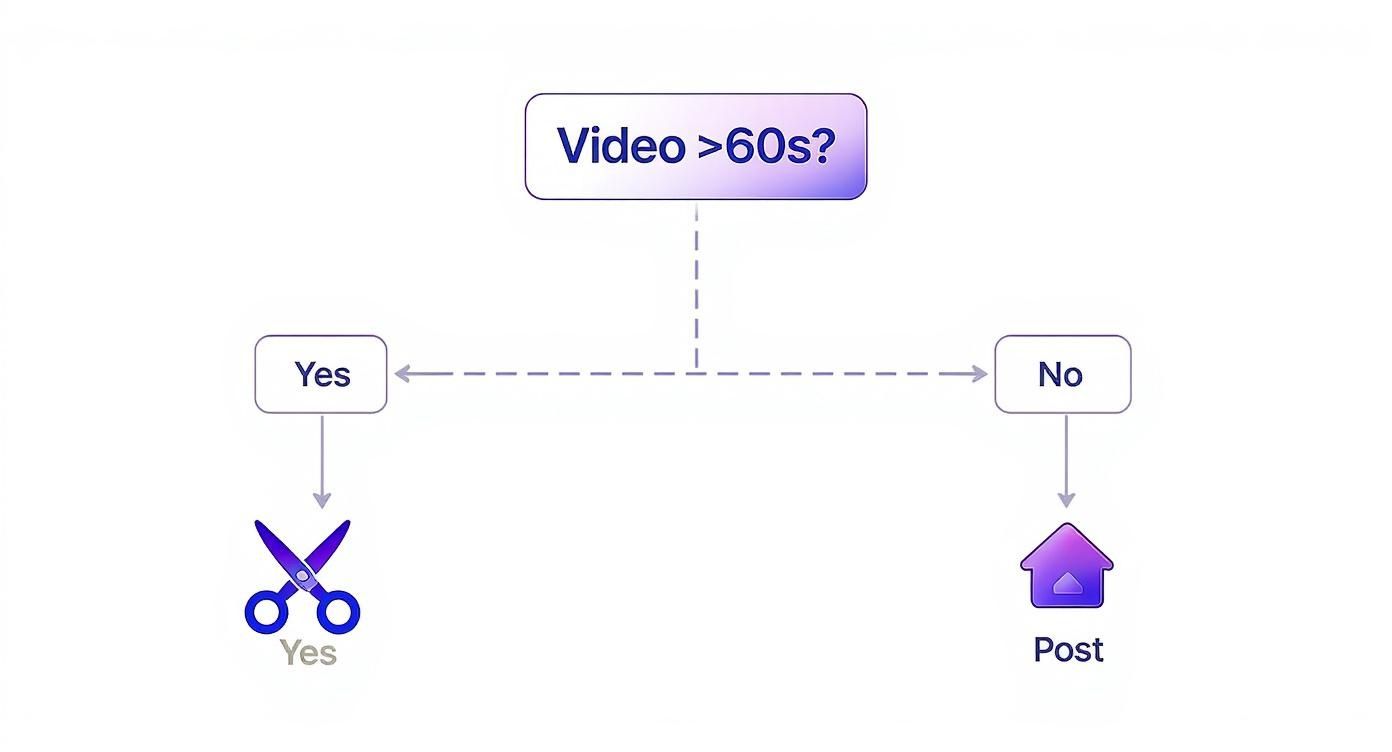
Bottom line: if your video is under that 60-second mark, you can post it as one seamless clip, keeping your viewers locked in.
Key Takeaway: Match your message to the format. Use Stories for immediacy, Reels for reach, and Feed videos for depth. This strategic approach ensures your content lands with the right audience in the right context.
To help you visualize where each format fits, here’s a quick comparison.
Instagram Video Format Length Comparison
| Video Format | Maximum Length | Best For |
|---|---|---|
| Stories | 60 seconds | Daily updates, behind-the-scenes, interactive polls, Q&As. |
| Reels | 90 seconds | Viral trends, short-form entertainment, reaching new audiences. |
| Feed Videos | 60 minutes | Tutorials, in-depth explanations, interviews, product demos. |
| Live | 4 hours | Real-time events, live Q&As, product launches, interactive streams. |
As you can see, each format has its own strengths. Picking the right one is key to getting the most out of your video content.
Of course, each format also needs to be sized correctly to look its best. You might want to check out our guide on vertical video dimensions to nail the technical specs every time. To see how Instagram's limits stack up against other platforms, you can also explore the video length sweet spots for TikTok, Reels, and Shorts.
Creative Strategies for Sharing Longer Videos
While Instagram’s auto-segmentation feature is handy in a pinch, letting the app make the cuts for you can lead to some seriously awkward transitions. Your perfect sentence might get sliced right in half, completely ruining the flow of your video.
Instead of leaving it to chance, you can take back creative control. By thinking a bit more strategically, you can turn the Instagram Story maximum length from a frustrating limit into a powerful storytelling tool. One of the best ways to do this is by pre-editing your video in a third-party app before you even open Instagram. This lets you create intentional 60-second clips, adding slick transitions, music, or text overlays that seamlessly connect each segment. The final product feels less like a chopped-up video and more like a cohesive mini-movie.
Create a Story Series
Another great approach is to reframe your long video as a "Story series." Instead of just one continuous video, think of each 60-second segment as its own little episode. Each part should have its own hook and resolution, all while building up to a larger narrative. This episodic format is fantastic for getting viewers to keep tapping forward to see what happens next.
For instance, if you're making a tutorial, you could break it down like this:
- Part 1: Introduce the problem you're solving.
- Part 2: Show off the tools or ingredients people will need.
- Part 3: Walk through the main part of the process.
- Part 4: Reveal the impressive final result.
This method builds suspense and keeps your audience locked in from the first segment to the last.
Tease and Redirect for Maximum Impact
Let's be honest: not every long-form video is meant to be watched in its entirety on Stories. A hugely effective strategy is to use your Story as a powerful teaser to send traffic somewhere else. You can create a punchy, 60-second trailer that highlights the absolute best moments of your full video.
By showing just enough to make people curious, you can use interactive stickers like the "Link in Bio" to guide your audience to the full-length version on YouTube, your blog, or your website.
This tactic not only respects the fast-paced nature of Stories but also turns passive scrollers into active visitors on your main content channels. For anyone looking to get more out of their existing content, our guide on how to post a YouTube video on Instagram has a ton of detailed steps for this exact process.
How to Maximize Engagement in Every Story
Knowing the Instagram Story maximum length is just the starting line. The real challenge—and where the magic happens—is keeping your audience totally hooked. It doesn't matter if your clip is 15 seconds or a full minute; you have to earn every single second of a viewer's attention.
Let's be honest, attention spans are short. The first three seconds are everything. You need an immediate hook to stop the swipe. Think of a compelling question, a visually stunning shot, or a bold statement that makes them have to see what's next. Once you've got them, your next job is to keep them interacting.
Drive Interaction with Stickers
This is where Instagram's interactive stickers become your best friend. They're designed to turn passive viewing into active participation, which is a massive signal to the algorithm that people are loving your content.
Even the simplest tools can make a huge impact:
- Polls & Quizzes: Ask for an opinion, test their knowledge, or just have some fun. These are super low-effort ways for your audience to tap and engage directly.
- Question Stickers: Flip the script and invite your followers to ask you anything. This not only creates a direct line of communication but also gives you a goldmine of user-generated content ideas for the future.
Remember, every single tap, vote, and response strengthens your connection with your audience and can seriously boost your Story's visibility.
The move to a 60-second limit wasn't random; it was a direct response to how people were using the app. One report from 2022 pointed out that 60-second Stories had a 72% completion rate, which blew shorter clips out of the water. It proves that viewers will absolutely stick around if the content delivers value.
And finally, a simple but crucial tip: don't forget your captions. A huge chunk of people watch Stories with the sound off. Adding clear, easy-to-read captions means your message always lands, making your content accessible and effective for everyone. For more advanced strategies, check out our full guide on how to increase Instagram engagement.
Got Questions About Instagram Story Length? We've Got Answers.
As you start playing around with the 60-second Story limit, you’re bound to have a few questions. Let's clear up some of the most common ones with straightforward, no-fluff answers. Think of this as your quick-reference guide.
Can I Really Post a 5-Minute Video to My Story?
Yep, you can. Just upload the full 5-minute video right to your Story, no pre-cutting required. Instagram handles the heavy lifting for you, automatically slicing it into five consecutive 60-second clips that play one after the other.
A word of advice, though: it's smart to think about where Instagram will make those cuts. You don't want a key sentence or a dramatic moment getting awkwardly split between two segments. A quick review of your video beforehand can help you avoid that jarring feeling.
Is the Story Length Different for Business Accounts?
Nope, the rules are the same for everyone. That 60-second maximum for a single Story clip applies whether you're a personal user, a creator, or a major brand. The auto-segmenting feature for longer videos also works the exact same way for all account types.
This is actually a great thing. It puts everyone—from individual creators to big companies—on a level playing field, giving them the same tools and time limits to tell their stories.
How Do I Add Music to a Full 60-Second Story?
It's super easy. Once your 60-second video is uploaded, just tap the sticker icon and hit the Music sticker. You can then hunt for the perfect song and drag the selector to choose which part you want to play over your video.
If your video is longer and gets broken into multiple clips, you'll have to add the Music sticker to each 60-second piece individually.
Why Did My Longer Video Get Cut Off?
While Instagram's auto-slicing is usually on point, tech hiccups can happen. If your longer video seems to get cut off or just won't upload completely, the culprit is often a massive file size or a shaky internet connection. The upload can time out before all the segments have been processed.
To avoid this, make sure you're using the recommended MP4 format and try to upload when you're on a solid Wi-Fi connection. If a video fails, the oldest trick in the book usually works: just try uploading it again.
Ready to create stunning, viral videos without the hassle? ClipShort uses AI to help you generate engaging, faceless short-form content in minutes. From scriptwriting to voiceovers and animated captions, we give you the tools to scale your video production and grow your audience effortlessly. Start creating for free at https://www.clipshort.co.