
How to Make a Highlights Video That Captures Attention
Making a highlights video is all about finding the most electric moments in your longer content and packaging them into something short, punchy, and shareable. You’re essentially curating your own best-of reel by selecting top-tier clips, trimming them down to the essentials, and weaving them into a compelling micro-narrative.
This is your ticket to stopping the endless scroll and getting people to actually pay attention.
Why Highlights Videos Are Your Secret Weapon

In the hyper-competitive world of social media, attention is everything. Highlights videos are built from the ground up to capture it, delivering maximum value in the shortest possible time. They’re the perfect hook, pulling viewers in with a concentrated dose of entertainment, emotion, or insight.
Think about it: a one-hour podcast or a 30-minute product demo has moments of pure gold, but they're often buried. A highlights video unearths that gold and puts it front and center. This move satisfies the modern viewer's need for instant gratification, respects their time, and makes them far more likely to engage.
Before we get into the "how," let's quickly break down the core ingredients that make these videos work. Think of this as your pre-flight checklist.
Core Components of an Engaging Highlights Video
A quick look at the essential ingredients that make a highlights video successful, giving you a checklist to follow before you start creating.
| Component | Description | Why It Matters for Engagement |
|---|---|---|
| A Strong Hook | The first 1-3 seconds of your video. | This is your one shot to stop the scroll. It must be intriguing, shocking, or ask a compelling question. |
| High-Value Moments | The "aha!" moments, key takeaways, or most emotional parts of your original content. | Viewers need immediate value. Delivering your best stuff quickly proves your content is worth their time. |
| Dynamic Pacing | Quick cuts, varied shot lengths, and energetic transitions. | Slow pacing loses attention. Fast, dynamic editing keeps the viewer's brain engaged and wanting more. |
| On-Screen Text | Captions, titles, or keyword callouts that add context and emphasis. | Most social videos are watched with the sound off. Text ensures your message lands, no matter what. |
| A Clear CTA | A specific instruction at the end, like "Follow for more" or "Link in bio for the full episode." | Don't just entertain; guide the viewer on what to do next. This turns passive viewers into active followers. |
Nailing these five components is the foundation for creating short-form content that doesn't just get views, but actually builds an audience.
The Power of Repurposing Content
One of the biggest wins with highlights videos is just how efficient they are. You're not starting from scratch; you’re squeezing every last drop of value out of content you’ve already created. This content repurposing strategy lets you show up on more platforms and reach new audiences without burning yourself out.
This is more important than ever. The video marketing world has absolutely exploded, with 91% of businesses now using it as a core part of their strategy. That statistic tells you one thing: video is non-negotiable for anyone trying to connect with an audience today.
By learning how to make a highlights video, you can turn one long-form asset into a whole library of content. For example, a single webinar can easily become:
- Five TikToks: Each one built around a different key tip or surprising stat.
- Three Instagram Reels: Showcasing the best moments from the audience Q&A.
- A YouTube Short: A 60-second summary of the webinar's main argument.
A great highlights video isn't just a random collection of clips. It's a carefully crafted micro-story that delivers a complete, satisfying experience in under 60 seconds.
Building Momentum and Driving Action
When it comes down to it, these short clips are more than just content—they're strategic business tools. They build brand awareness, drive traffic back to your site, and foster a community by consistently delivering value in a format people genuinely enjoy. Each clip is like a breadcrumb, leading viewers back to your full-length content, your products, or your profile page.
Knowing how to do this well is a foundational skill for any modern creator or marketer. It’s about so much more than just trimming clips; it's about learning to tell a story that sticks. For a deeper look at this, be sure to check out our guide on how to create engaging social media content.
Finding the Gold in Your Raw Footage
Let’s be honest, the secret to a killer highlights video isn't some crazy expensive editing software. It’s what you do before you even think about opening your editor. Rushing this first part is a recipe for disaster—it's like trying to build a house with no blueprint. You have to be strategic to turn hours of raw video into a story that grabs someone in 30 seconds.
First things first: what’s the point of the video? Without a clear goal, you’re just stringing random clips together. Are you trying to get a laugh, teach a quick skill, or show off an epic win from a livestream?
Defining your objective is like putting on a pair of special glasses. It instantly helps you filter out all the noise and focus only on the footage that matters. This one simple step separates a forgettable montage from a video that actually gets results.
How to Define Your Video Goal
Before you watch a single frame, ask yourself this one question: What do I want the viewer to feel or do after watching? That answer is your North Star.
- To Entertain: Maybe you’re just going for pure laughs. Your goal is to hunt down moments of genuine humor, surprise, or total absurdity.
- To Educate: You might be pulling a key insight from a long webinar. Here, your mission is to find one concise, valuable tip that solves a real problem for your audience.
- To Inspire: Got a clip of an unbelievable comeback in a gaming stream? Your goal is to build that tension and showcase the emotional high of the victory.
- To Drive Action: If it's a product demo, you're looking for that one feature that makes a user's life way easier, making them want to click your link to learn more.
Nailing down your goal isn't optional. It sharpens your focus, saves you from hours of mindless scrolling through footage, and makes sure your final video packs a real punch.
Sifting Through Your Content for Golden Nuggets
With a clear goal locked in, reviewing your footage stops being a chore and turns into a treasure hunt. You're no longer just passively watching; you’re actively scanning for moments that serve your purpose.
Let's say you've got a one-hour podcast recording and you want to make a 30-second Reel to get people curious about the full episode. You’re not just looking for "good parts"—you're looking for specific pieces that build a tiny, compelling story.
Pro Tip: Don't try to find clips and edit them at the same time. Do one pass just to find and timestamp potential moments. This keeps you focused on picking the best content instead of getting stuck on technical edits.
As you scan your footage, keep an eye out for these high-impact ingredients:
- Emotional Peaks: Raw laughter, genuine surprise, visible frustration, or a sudden "aha!" moment. Human emotion is magnetic and makes your content instantly relatable.
- Controversial Takes: A strong, maybe even unpopular, opinion that makes people stop scrolling and think. This is gold for sparking comments and debate.
- Actionable Advice: A single, clear tip someone can use right away. Delivering value is one of the most powerful ways to hook viewers.
- Surprising Twists: An unexpected outcome in a game, a shocking statistic from a presentation, or a funny off-the-cuff remark. The element of surprise is a pattern interrupt that resets a viewer's attention.
A Practical Scenario From Podcast to Reel
Let’s run through that podcast example. We have 60 minutes of video and our mission is to create a 30-second promo clip that makes people need to hear the full episode.
- The Hook (0-3 seconds): I'll start by scanning the podcast transcript for a bold question or a provocative statement. Ah, found one at the 22:14 mark where the guest asks, "What if everything you know about marketing is wrong?" Perfect. That's my opener.
- The Buildup (4-15 seconds): Now I need a little context, but without giving away the secret. At 23:02, the host breaks down a common marketing myth. I can trim that down to a punchy 10-12 seconds.
- The Climax (16-25 seconds): Time for the payoff. The guest drops a jaw-dropping statistic at 24:30 that completely flips the old way of thinking on its head. This is the "aha!" moment that forms the core of the video.
- The CTA (26-30 seconds): To close it out, I’ll grab a quick clip of the host saying something like, "We break it all down in this week's episode." This tells the viewer exactly what to do next.
See what happened there? I didn't just grab four random "good" clips. I strategically selected four pieces that work together to build intrigue and deliver on my goal. That’s the real art of finding the gold in your footage.
Crafting Your Narrative Through Editing
This is where the magic really happens. Your pile of carefully chosen clips is about to become a story. Editing is how you transform that raw potential into a polished, attention-grabbing highlights video that people actually want to watch. The goal isn't just to jam moments together; it's to weave a narrative that flows so well, the viewer never even thinks about the cuts.
Truly great editing feels invisible. It's there to guide the viewer's attention and emotions without screaming, "Hey, look at this flashy transition!" Every single trim, cut, and sequence change needs to serve the story you're telling. This is the difference between a video people watch and one they remember.
Trimming Clips with Surgical Precision
First rule of editing for short-form video? Be ruthless. Seriously. Your original clips are probably full of fluff—awkward pauses, filler words, and moments that just don't pack a punch. Your job is to slice and dice every clip down to its most potent, impactful core.
On a 30-second video, every single second is prime real estate. If a moment doesn't directly help you achieve your goal (whether that's to entertain, educate, or inspire), it's got to go. Think of yourself as a sculptor chipping away at a block of marble. You’re removing everything that isn’t the final masterpiece.
This simple process helps you focus on only the best moments from the get-go.
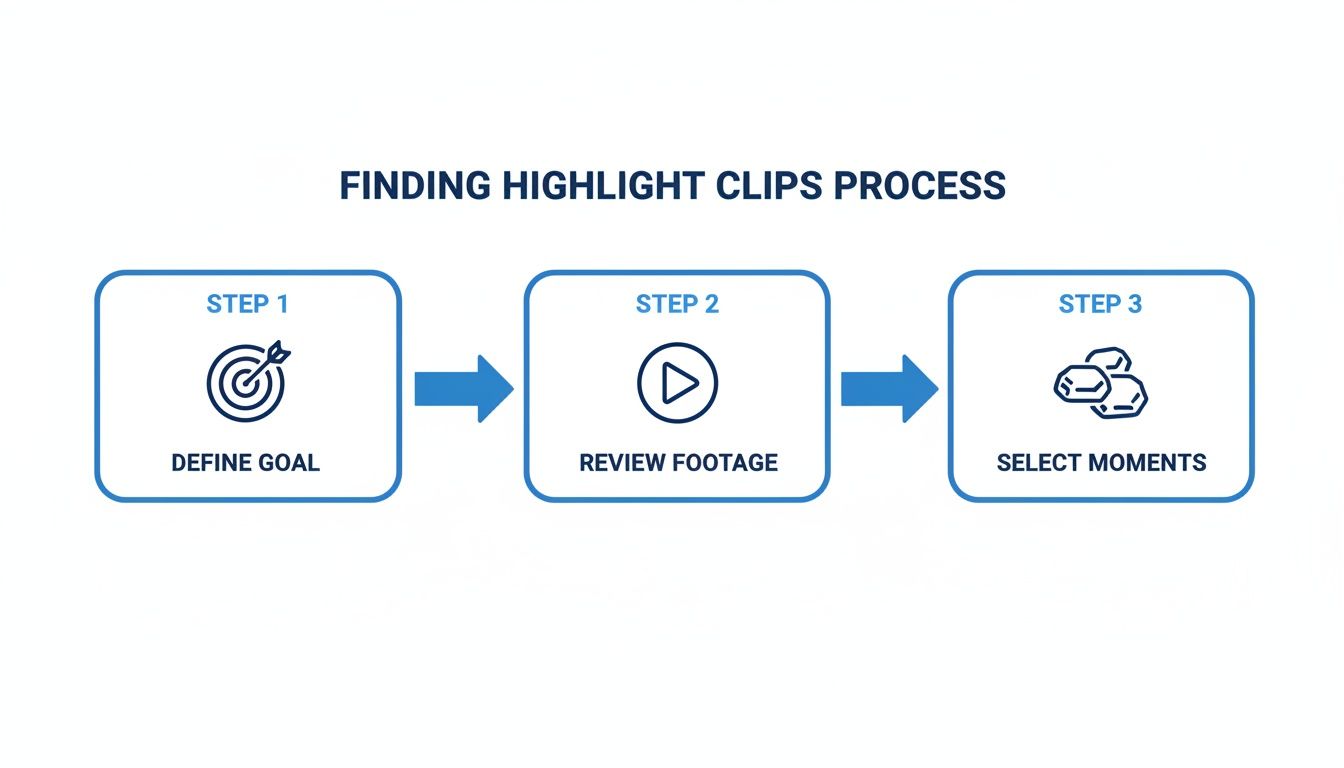
Following this ensures that by the time you sit down to edit, you're only working with A-list clips. This makes the whole trimming process faster and way more effective.
Sequencing Your Clips for Narrative Flow
Okay, your clips are lean and mean. Now, how do you arrange them? The order you place your clips in completely dictates the story and the emotional ride for the viewer. Just dropping them in chronological order is almost never the best approach. You need to think like a storyteller.
A tried-and-true structure for highlights videos follows a simple, powerful pattern:
- The Hook: Kick things off with your most shocking, intriguing, or visually stunning clip. This is what grabs someone in the first crucial 1-3 seconds.
- The Context: Next, drop in a clip or two that gives just enough background for the main event to make sense. Don't over-explain; keep it snappy.
- The Climax: This is your main event—the punchline, the epic win, the mind-blowing tip. It’s the entire reason someone is watching in the first place.
- The Resolution/CTA: Wrap it up with a final clip that provides a sense of closure or, even better, tells the viewer what to do next (e.g., "Follow for more!").
Arranging your clips this way turns a random assortment of moments into a tight, cohesive micro-story. This is way more satisfying for a viewer than a boring, unstructured montage.
Mastering Pacing and Rhythm
Pacing is the secret sauce of an addictive edit. It’s the rhythm and speed of your cuts, and it directly controls how the viewer feels. A video with flat, monotonous pacing feels sluggish and boring, even if the content itself is gold.
To create a dynamic pace, you need to vary the length of your clips.
- Fast Cuts: String together a series of super short clips (think less than a second each) to build excitement, show a flurry of action, or create a sense of urgency. This works wonders for sports highlights or action sequences.
- Slower Moments: Let a key moment breathe by allowing the clip to play for a few seconds. This is perfect for landing a joke or letting an emotional beat really sink in.
The art of great pacing is all in the contrast. By mixing quick, energetic cuts with slightly longer, more deliberate moments, you create a rhythm that keeps the viewer locked in and prevents their thumb from swiping away.
Choosing Transitions That Serve the Story
Transitions are the bridges between your clips, but a word of caution: less is more. While modern editing apps dangle countless flashy options in front of you, the best transition is usually the simplest one. Your goal is a seamless flow, not a distracting special effect.
For the vast majority of highlights videos, a clean jump cut is all you'll ever need. This is when one clip just abruptly ends and the next one begins. It’s fast, modern, and keeps the energy high—perfect for platforms like TikTok and Reels.
If you absolutely must use a fancier transition, make sure it has a purpose. A quick zoom or a smooth slide can help signal a shift in topic or location, but please, avoid the star wipes and page peels. They look dated and unprofessional. When learning how to make a highlights video, just remember: a good transition is one you don't even notice.
Adding Polish with Text, Music, and Visuals
Okay, you've assembled your best moments into a solid sequence. The core story is there. But to make it truly pop on social media, you need that final layer of polish.
This is where you add the text, music, and other small details that stop the scroll and keep people watching. These aren't just decorations; they're essential tools for engagement, especially in a world where most people watch with the sound off.
Captions Are Not Optional
Let’s get one thing straight: on-screen text isn't a "nice-to-have." It's a must.
Video is projected to account for a staggering 82% of all internet traffic, with a huge chunk of that viewed on mobile. If you're relying on audio to tell your story, you’ve already lost a massive part of your audience who are scrolling in public, at work, or just don't want the sound on.
Dynamic captions also add a ton of visual energy. They can emphasize your most important points and guide the viewer's eyes exactly where you want them.
Here are a few styles that work well:
- Simple & Clean: A basic, readable font at the bottom. It's a classic for a reason—it’s professional and never distracting.
- Dynamic & Animated: Think words popping on screen one-by-one or changing color. This is the go-to style on TikTok and Reels for a reason; it keeps the energy high.
- Branded Fonts: Got a specific font and color scheme for your brand? Use it! This makes your content instantly recognizable in a crowded feed.
A quick pro-tip: always watch your video back on a phone before you post. Text that looks great on a desktop monitor can be completely unreadable on a small screen. Clarity is everything.
Choosing the Right Soundtrack
Sound is your video's emotional core. The right song or sound effect can completely transform a scene, build suspense, or make a punchline land ten times harder.
Mastering the art of incorporating music and sound effects in video content creation is a skill that separates amateur edits from professional ones.
When you're browsing for a track, ask yourself what vibe you're going for. Upbeat and high-energy for a workout montage? A chill lo-fi track for a calming tutorial? The music should always support what's happening on screen, not fight it for attention.
And please, get the mix right. Your music should be in the background, not drowning out dialogue or key audio from your clips. For a deeper dive, we have a whole guide on how to sync sound and video.
Adding Visual Flair Without Creating Clutter
Lastly, little touches like emojis, GIFs, and simple graphics can inject a lot of personality. A well-placed emoji can add context (like a 👇 pointing to your call-to-action) or just make a moment funnier.
The key word here is strategic. Don't just throw things on the screen. Every visual element should have a purpose. If your screen starts to look like a chaotic mess, you've gone too far.
Before you hit export, run through this quick final checklist:
- Captions: Are they accurate, easy to read, and perfectly timed?
- Music: Does the track match the mood you're trying to create?
- Audio Mix: Is the music volume low enough so any talking is crystal clear?
- Visuals: Does every single emoji or graphic serve a purpose and avoid clutter?
This final 10% of effort is what takes a video from "good enough" to something people will actually watch, share, and remember.
Optimizing Your Video for Maximum Reach
Creating a fantastic highlights video is a huge win, but the job isn't over when you hit export. The final, and arguably most critical, step is making sure your masterpiece actually gets seen. This is where you tailor everything for the specific platform you’re posting on.
TikTok, Instagram Reels, and YouTube Shorts each have their own algorithm, audience, and technical quirks. A one-size-fits-all approach just doesn't work anymore. Taking a few extra minutes to optimize for your destination platform can be the difference between a few dozen views and reaching thousands of new fans.
Nail Your Platform Export Settings
Before you even think about writing a caption, you have to get the technical stuff right. Uploading a video with the wrong dimensions or a low resolution can lead to awkward cropping, blurry visuals, and just an overall amateur look. It's a quick way to get scrolled past.
Think of these export settings as the foundation of your post. If the foundation is shaky, everything else you build on top of it is going to suffer.
Platform Export Settings for Highlights Videos
Here's a quick-reference table to make sure your video looks crisp and professional every single time, no matter where you're posting.
| Platform | Best Aspect Ratio | Maximum Length | Recommended Resolution |
|---|---|---|---|
| TikTok | 9:16 | 10 minutes (aim for 15-60s) | 1080x1920p |
| Instagram Reels | 9:16 | 90 seconds (aim for 15-30s) | 1080x1920p |
| YouTube Shorts | 9:16 | 60 seconds | 1080x1920p |
The key takeaway? The 9:16 vertical format is king. It's the universal standard for short-form video, so always shoot and edit with this in mind to fill the entire screen and grab maximum attention.
Write Captions That Spark Conversation
Your caption is your second chance to hook a viewer. It’s where you add context, inject your personality, and—most importantly—encourage people to engage. Please, don't treat it like an afterthought.
Instead of just describing what's in the video, use your caption to ask a question, state a bold opinion, or tell a quick, relatable story. The goal is simple: get people to stop scrolling, think for a second, and drop a comment.
- Weak Caption: "Here are some highlights from my stream."
- Strong Caption: "I can't believe this happened live. Have you ever had a moment like this? Tell me below 👇"
The second example doesn't just talk at the viewer; it invites them into a conversation. That's a huge signal to the algorithm that your content is worth pushing.
Master the Call to Action
Every single video you post should have a purpose. What do you want the viewer to do next? A strong Call to Action (CTA) is how you guide them toward that goal, turning passive scrollers into active community members.
Don't be shy about it. Your CTA should be direct, clear, and easy to follow. Tell people exactly what you want them to do.
The best CTAs are specific and offer a clear benefit. Instead of a generic "check out my stuff," tell them why they should. For example, "Follow for daily tips on this topic" or "Click the link in my bio to get the full guide."
A few proven CTAs that just work:
- "Follow for Part 2"
- "Comment your biggest takeaway"
- "Tag a friend who needs to see this"
- "Full video in my bio link!"
Create an Unbreakable Loop
One of the sneakiest—and most powerful—metrics on platforms like TikTok is rewatch rate. When someone watches your video more than once, it signals to the algorithm that your content is really good.
A seamless loop is a clever trick to boost this metric. You just edit your video so the end flows perfectly back into the beginning, making it hard to tell when the clip has restarted. This can trick people into watching two, three, or even four times, which can dramatically boost your video's reach.
And of course, getting your timing right is a huge piece of the puzzle. Understanding the best time to post on social media can give your perfectly optimized video the initial boost it needs to catch fire.
Knowing what makes a video take off is part art, part science. If you really want to get into the weeds, our guide on what makes a video go viral breaks down the key ingredients.
Got Questions About Making Highlights Videos?
Even when you feel like you've got the hang of it, a few tricky questions always seem to pop up. Hitting a technical snag or a creative wall is a real momentum killer. I've been there. This section is all about giving you quick, no-fluff answers to the hurdles I see creators face most often so you can get back to making amazing content.
What's the Best Free Software for Making a Highlights Video?
Good news: you don't need to break the bank to get pro-level results. There are some seriously powerful free tools out there, whether you're an on-the-go mobile editor or prefer a full desktop setup.
If you're editing on a computer, DaVinci Resolve is an absolute beast. Its free version is packed with professional-grade editing tools, unbelievable color correction features, and audio tools that honestly compete with paid software. It has a bit of a learning curve, but for a free tool, its power is unmatched.
For mobile editing, CapCut is basically the king right now, and for good reason. It’s super intuitive, stuffed with trendy effects, and its auto-captioning is one of the best around—perfect for whipping up TikToks and Reels. InShot is another fantastic mobile option, giving you all the essentials for trimming, adding music, and slapping on text in a clean interface. The "best" one really just boils down to your personal workflow.
How Long Should My Highlights Video Be?
This is probably the most critical question, and the answer almost always circles back to the platform and what you're trying to achieve. The golden rule? Be as short as possible while still telling a complete, satisfying story.
Here's a quick rundown that I stick to:
- TikTok and Instagram Reels: The sweet spot is 15-30 seconds. This is just long enough to tell a mini-story but short enough to keep people glued to the screen. High watch-time is a massive signal to the algorithm that you've got engaging content.
- YouTube Shorts: You get a little more breathing room here, up to a 60-second max. This is great for highlights that need a bit more context or a slightly more complex narrative.
Always ask yourself this one question: "Does every single second of this clip earn its spot?" If the answer is no, cut it. Ruthless editing is what separates a tight, impactful video from one that viewers scroll past.
How Do I Find Good Background Music That Won’t Get My Video Taken Down?
Using copyrighted music without a license is the fastest way to get your video muted, demonetized, or straight-up deleted. Luckily, finding great, safe-to-use music is easier than ever.
Your safest and often best bet is to use the built-in music libraries on TikTok and Instagram. These platforms have the licensing handled, and hopping on a trending sound from their library can actually give your video a huge boost in visibility.
If you want something more unique or you're posting elsewhere, royalty-free music sites are your new best friends.
- YouTube Audio Library: A massive, totally free collection of tracks and sound effects.
- Epidemic Sound & Artlist: These are subscription services, but the quality is top-tier. Most big creators use one of these.
- Pixabay & Mixkit: Both offer fantastic selections of completely free music, no subscription needed.
My Highlights Videos Aren't Getting Many Views. What Am I Doing Wrong?
Ugh, low view counts are the worst. It's super discouraging, but it's almost always a fixable problem that comes down to a few key things. Before you throw in the towel, run your content through this quick diagnostic check.
- The Hook: Are you grabbing attention in the first 1-3 seconds? Seriously, that's all the time you have. If your opening is weak, people are gone. Start with the most shocking, funny, or valuable moment—no exceptions.
- The Content Itself: Are the moments you chose actually interesting to your target audience? Your highlights need to deliver instant value or entertainment. Be honest with yourself.
- The Optimization: Are you using a good caption, relevant hashtags, and a clear call-to-action? And are you posting when your audience is actually online? All these little things add up.
- The Engagement Triggers: Are you asking questions or doing anything to encourage comments? The algorithm loves videos that spark a conversation, so give people a reason to chime in.
Troubleshooting low views is just a process of elimination. I always start by looking at the hook—it's the most common culprit—and then work my way down the list.
Ready to stop manually searching for clips and start producing viral content at scale? ClipShort uses AI to find the best moments in your long-form videos, automatically generate scripts, add lifelike voiceovers, and create scroll-stopping captions in minutes. Turn your ideas into polished, ready-to-post short videos without ever touching a complex timeline. See how thousands of creators are growing their channels faster at https://www.clipshort.co.