
How to Create Videos with AI From Scratch
Creating videos with AI isn't some far-off future concept; it's happening right now. The workflow breaks down into four simple stages: generating a script, creating a voiceover, producing visuals, and pulling it all together in an editor.
This modern approach completely flips the old model on its head, getting rid of the need for expensive gear and endless hours of editing. You can now crank out high-quality, short-form videos faster than ever.
The New Reality of AI Video Creation
Not too long ago, video production felt like a members-only club. You needed expensive cameras, a degree in complex software, and a whole lot of time. That's just not the case anymore.
Artificial intelligence has completely leveled the playing field, making it possible for anyone with a laptop to produce engaging, professional-looking content. This isn't just a small update—it’s a total shift in how we approach creating content.
This guide will walk you through the entire process for making faceless videos perfectly suited for platforms like TikTok, Instagram Reels, and YouTube Shorts. You’ll see exactly how AI can do the heavy lifting, from writing the script to generating the visuals, freeing you up to focus on the creative side of things.
Why This Matters for Creators and Marketers
The ability to create compelling videos with AI is a massive advantage. If you're a solo creator, it means you can finally produce content consistently without hitting burnout. For marketers, it opens the door to test new campaigns, create product demos, and connect with your audience at a scale that used to require a serious budget.
The market growth tells the same story. The AI video generator market, currently valued at USD 614.8 million, is expected to explode to USD 2,562.9 million by 2032. This isn't just about cool new tech; it's about making video creation more accessible and efficient for everyone.
The biggest takeaway here is this: Your job as a creator is no longer about mastering technical tools. Instead, it’s about becoming a great director of AI, guiding different tools to bring your unique vision to life.
Your AI Video Creation Toolkit
To really make AI work for you, you need to know what tools are out there for each part of the process. The ecosystem is growing incredibly fast, with specialized solutions for everything from scripting to the final edit.
Getting a handle on these categories is the first step to building a workflow that actually saves you time. While I'll mention specific tools in this guide, it's also a great idea to get familiar with the broader landscape of the 12 best AI tools for video editing to see what's possible.
To help you get started, here’s a quick breakdown of the essential tools you’ll need for each stage of your video creation workflow.
Your AI Video Creation Toolkit at a Glance
This table provides a quick summary of the essential AI tools for each stage of the video creation process, from scripting to final export.
| Creation Stage | Tool Category | Popular Examples | Primary Function |
|---|---|---|---|
| Ideation & Scripting | AI Text Generators | ChatGPT, Jasper | Brainstorms topics and writes video scripts. |
| Voiceover | AI Voice Generators | ElevenLabs, Murf.ai | Converts text scripts into lifelike audio. |
| Visuals | AI Image & Video Generators | Midjourney, Runway | Creates custom images or video clips from prompts. |
| Editing & Assembly | Video Editors | ClipShort, CapCut | Combines audio, visuals, captions, and music. |
Think of these tools as your new production crew. By picking the right one for each job, you can streamline your process and focus on what truly matters: creating content that connects with your audience.
Crafting Viral Ideas and Scripts with AI
Every killer short-form video starts with two things: a great idea and a tight script. But let's be real, the blank screen struggle is something every creator knows. This is exactly where AI flips the script, becoming your tireless creative partner. Forget waiting for a muse—you can now generate inspiration on demand.
Using AI text generators like ChatGPT or Jasper isn't just about writing; it's about changing how you brainstorm. You can go from zero ideas to a list of 10 viral-worthy concepts in the time it takes to make coffee. Think of the AI as a collaborator that never gets tired or runs out of suggestions. This workflow shift is the key to scaling your content production.
This diagram really nails the difference between the old way of making videos and the new AI-powered workflow.
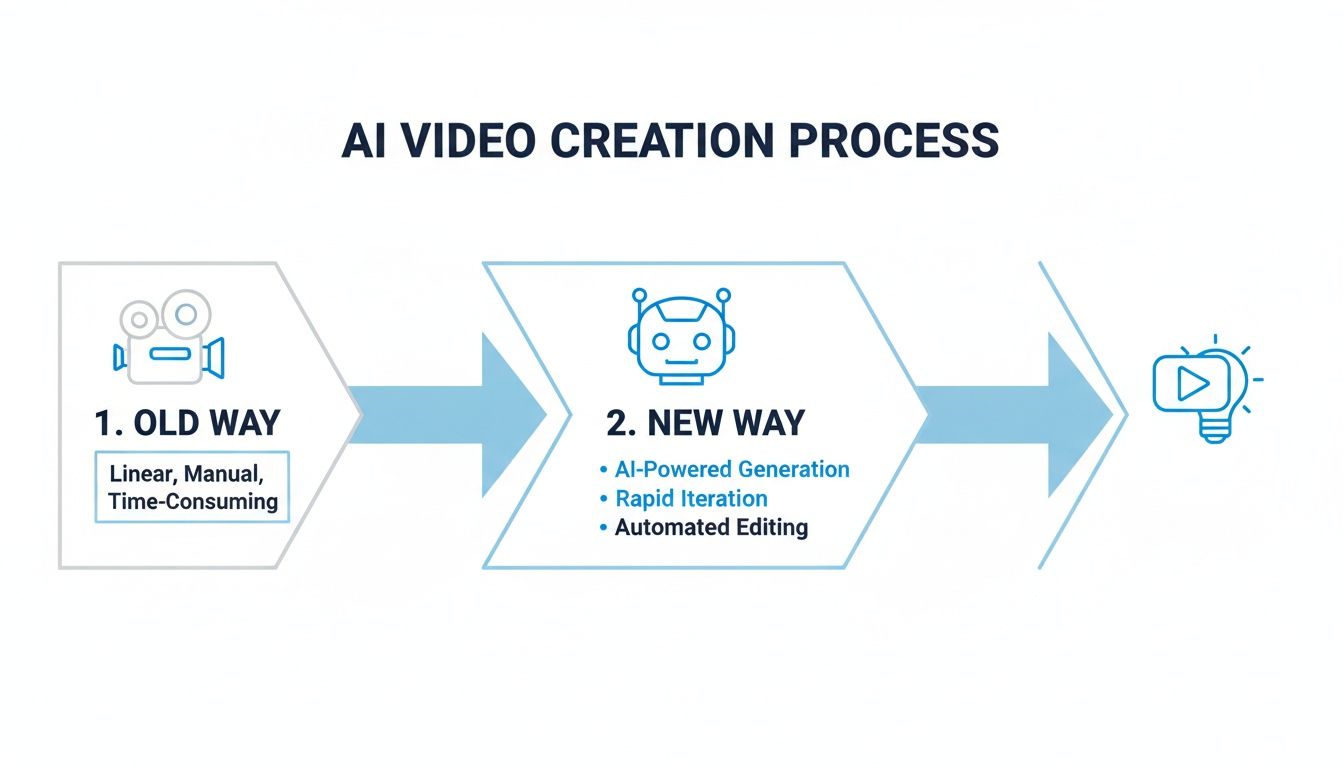
You can see how AI takes a bunch of messy, time-consuming steps and turns them into a straight line from idea to finished video.
Prompting for Viral Hooks
The first 3 seconds. That’s all you get. Your hook has to be an absolute showstopper, and AI is fantastic at churning them out. But a generic prompt like "write me a video hook" will get you generic results. You need to get specific.
Here’s how you get hooks that actually work:
- Specify the Format: "Generate 5 hooks for a 60-second TikTok video."
- Define the Target Audience: "The audience is millennial homeowners who love DIY projects."
- State the Core Topic: "The video is about a common painting mistake that ruins walls."
- Set the Emotional Tone: "Make the hooks surprising and a little controversial."
Giving the AI these constraints forces it to think inside a very specific box, leading to much sharper, more relevant ideas. It's really interesting to see how AI can help us be more creative not by replacing our ideas, but by giving us better starting points.
Structuring the Narrative
Once you’ve got a hook that grabs them, you need a simple story to keep them watching. For shorts, a tried-and-true formula is Hook -> Problem -> Solution -> Call-to-Action (CTA). AI can flesh this out for you in seconds.
Pro Tip: Always tell the AI to write in a conversational, informal tone. I use phrases like "write this like you're explaining it to a friend" or "use simple language" to make sure the script doesn't sound like a robot wrote it.
Let's stick with our painting example. Say your hook is, "You're probably ruining your walls with this one painting 'hack'." Your follow-up prompt could be: "Now, expand on this hook. Describe the problem (using the wrong painter's tape) and the solution (using a specific brand of tape and a pro technique). End with a CTA asking viewers to share their own DIY horror stories in the comments."
This kind of back-and-forth guides the AI to build a complete script that actually makes sense.
The Master Prompt for Instant Scripts
To really speed things up, I like to combine everything into a single "master prompt." This is a huge time-saver when you're trying to create content consistently. It gives you a complete, ready-to-use script in one shot. And once you have the script, you can even find tools to turn it directly into a video. If you're curious, we have a whole guide on using a script to video AI free tool.
Here’s a template I've had a lot of success with. Feel free to copy and adapt it:
Act as an expert scriptwriter for viral social media videos. Write a script for a [Platform, e.g., TikTok] video that is [Length, e.g., 45 seconds] long.
**Topic:** [Your Video Topic]
**Target Audience:** [Describe Your Audience]
**Tone:** [e.g., Funny, Educational, Inspiring]
**Structure:**
1. **Hook:** An attention-grabbing question or a bold statement.
2. **Body:** Three short, punchy points explaining the main topic.
3. **CTA:** A clear call-to-action that encourages comments or shares.
Write the script in a simple, conversational style. Keep sentences short and easy to digest.
A well-crafted prompt like this one turns the AI from a simple text generator into a powerful, strategic partner in your content creation process.
Generating Lifelike Voiceovers and Visuals
Okay, you've got a killer script. Now for the fun part. This is where your faceless video starts to feel real—where words get a voice and your story gets a look. We're about to turn that text file into the core audio and visual pieces of your final video.
First up, the voiceover. Sure, you could record it yourself, but AI voice generators are a massive shortcut, offering incredible speed and consistency. The quality has gone from clunky and robotic to genuinely human, with voices full of nuance and emotion.
Choosing the Right AI Voice
Don't just pick any voice. Your voiceover is the personality of your faceless brand, and it sets the entire tone of the video. This is a strategic decision. A tool like ElevenLabs has become the go-to for a reason—it has a massive library of top-tier voices and lets you get deep into customization.
When you're browsing for a voice, think about:
- Brand Alignment: Does the voice sound like your brand feels? A history channel might need a deep, authoritative tone. A channel reviewing the latest tech? Something more energetic and upbeat would probably work better.
- Pacing and Cadence: Listen to how the AI delivers its lines. Some voices are naturally quick, perfect for high-energy TikToks. Others are slower and more deliberate, which is great for thoughtful YouTube Shorts.
- Emotional Range: The best AI voices can handle emotion. Before you commit, drop in a few lines from your script that need a specific feel—like excitement, curiosity, or urgency—and see how it performs.
Here’s a peek inside ElevenLabs, where you can play around with different voices to find the perfect match.
The platform even lets you tweak settings like stability and clarity, giving you tight control over the final audio.
My Personal Tip: Don't just paste your entire script in and hit "generate." I always break it down into smaller chunks—a paragraph or even just a sentence at a time. This lets you manually add pauses and adjust the pacing, which makes the final narration sound way more natural.
Creating Cohesive Visuals
With your audio locked in, it’s time to build the visual world for your story. This is where text-to-image and text-to-video generators like Midjourney or Runway are indispensable. The goal here isn't just to make cool images; it's to create a consistent visual style that ties the whole video together.
Nothing screams "cheap AI video" more than visuals that jump all over the place, from photorealistic one second to cartoonish the next. It's jarring, and it breaks the viewer's immersion. The secret to avoiding this is all in your prompts.
This level of efficiency is exactly why the AI video generator market is exploding. Projections show it expanding at a 19.9% CAGR through 2030. Why? Because these tools can slash video production costs by up to 80% and cut down creation time by 70% compared to doing it all manually.
Writing Effective Visual Prompts
To keep your visuals consistent, you need what I call a "style seed." This is a short, descriptive phrase you tack onto every single prompt to lock in the aesthetic.
Let's say you're making a video about stoic philosophy. Your style seed could be something like: "cinematic, dramatic lighting, marble sculpture aesthetic, detailed, 8k".
Here’s how you’d use it for different scenes:
- Scene 1 Prompt:
A wise old philosopher with a long beard, cinematic, dramatic lighting, marble sculpture aesthetic, detailed, 8k. - Scene 2 Prompt:
An ancient Roman forum at sunset, cinematic, dramatic lighting, marble sculpture aesthetic, detailed, 8k. - Scene 3 Prompt:
A close-up of a scroll and quill on a wooden desk, cinematic, dramatic lighting, marble sculpture aesthetic, detailed, 8k.
By repeating that core phrase, you're telling the AI to render every image inside the same visual universe. This one trick is probably the single most effective thing you can do to level up the quality of your AI-generated videos.
For a deeper dive into the tools that make all this possible, check out our list of the best AI tools for content creators. It covers a ton of powerful options for every part of this workflow.
Assembling and Polishing Your Final Video
Alright, you've got all the pieces: a killer script, a smooth AI voiceover, and a collection of stunning visuals. Now for the fun part—putting it all together into a video that actually stops the scroll. This is where you weave all those separate assets into a single, cohesive story.
You don't need to break the bank on professional software for this. Seriously. User-friendly editors like CapCut or Veed.io are more than powerful enough. They’re built for the quick-turnaround world of short-form video and pack a surprising punch, making them perfect for this AI-driven workflow.
Syncing Your Visuals and Voiceover
First things first: drop your AI voiceover track onto the editing timeline. This audio is your guide, the foundation that dictates the entire pace and flow of your video.
Listen to the voiceover a couple of times to internalize its rhythm. Once you have a feel for it, start dragging your AI-generated images and clips onto the timeline, right above the audio track. The whole game here is to match the visuals to the narration. If the voiceover mentions "ancient Roman forums," that’s exactly when the image of the forum should pop up on screen.
A rookie mistake I see all the time is letting shots linger for too long. On TikTok and Reels, you need to be relentless. Aim to introduce a new visual every 1-3 seconds. This keeps the pace snappy and holds a viewer's notoriously short attention span.
Getting this timing right is what separates amateur content from a professional-looking video. If you're just starting out, it's worth checking out a solid guide on how to sync sound and video to really nail the basics. This skill alone will elevate your content quality tenfold.
Adding Dynamic Animated Captions
Think about how you scroll through social media—probably with the sound off, right? That’s why captions aren't just an accessory; they're essential.
Forget typing everything out by hand. Modern editors have incredible auto-captioning features. With a single click, the tool will transcribe your entire voiceover and sync the text perfectly to the audio. It’s a massive time-saver.
Once the text is generated, it’s your job to make it look good. Don't just leave the default font. Treat your captions as a core part of the visual experience.
- Pick a Bold Font: You need something thick and easy to read that won’t get lost in the background.
- Use Your Brand Colors: If you have them, use them. It’s a simple way to build brand recognition.
- Animate the Text: A subtle "pop" or "fade" effect on the words makes the video feel much more alive.
- Highlight Key Words: Make important words a different color. This pulls the viewer's eye and adds emphasis.
These little tweaks make a huge difference, ensuring your message gets across whether the audio is on or off.
Finding the Perfect Music
The last piece of the puzzle is the music. A good soundtrack sets the entire mood of your video—it can create tension, inspiration, or excitement. Luckily, editors like CapCut have vast libraries of royalty-free music, so you don’t have to worry about copyright claims.
Think about the feeling you want to evoke. Is the video educational? Uplifting? Mysterious? Search the music library with keywords like "epic," "chill," or "upbeat" to find a track that matches that vibe.
When you find the one, drag it onto your timeline and immediately turn the volume down. The music should support the voiceover, not fight with it. I usually set the music volume to about 10-20%, just enough to be felt in the background without drowning out the narration.
And just like that, your AI-powered video is ready to be unleashed.
Scaling and Optimizing Your AI Video Strategy
Hitting ‘publish’ isn’t the finish line; it’s just the start. You've created a video with AI, but that’s only half the battle. Now comes the real work: making sure your content actually finds an audience and gets results. This is where you shift from being a producer to a strategist.
The goal is to build a smart feedback loop where every video informs the next. When you understand what’s working, you can stop guessing, double down on winning formats, and truly scale your production.
Tailor Your Content for Each Platform
You can't just post the same video everywhere and expect it to pop off. TikTok, Instagram Reels, and YouTube Shorts each have their own culture, algorithm, and audience. A one-size-fits-all approach just doesn't work.
A perfect example of this is trending audio. On TikTok and Reels, a video's success is often tied directly to the sound it uses. The good news is you can easily add a trending sound right inside their native apps. Just import your finished AI video, mute the original audio, and layer the popular track over it. Your animated captions will keep the story clear.
Think about these platform-specific adjustments:
- TikTok: This is the home of fast cuts, trending sounds, and interactive features like polls and stitches. The vibe is often more casual, raw, and experimental.
- Instagram Reels: Tends to favor higher-quality visuals and more polished, aesthetically pleasing content. It’s a great spot for tutorials, behind-the-scenes content, and inspirational stories.
- YouTube Shorts: The algorithm here loves videos that create a perfect loop, encouraging viewers to watch over and over. Educational content and quick, condensed stories do incredibly well.
The Power of Rapid Iteration
One of the biggest advantages of an AI workflow is pure speed. Forget spending hours reshooting a scene just to change one line. Now, you can spin up multiple versions of a single video concept in minutes and see what your audience actually prefers.
This lets you A/B test the elements that really move the needle in short-form video. You can easily test different:
- Hooks: Generate three different opening lines for your script and create a unique video for each one.
- Visuals: Pit a video with a cinematic style against one with an anime aesthetic to see which gets more watch time.
- Calls-to-Action: Find out if asking for a "comment" drives more engagement than asking for a "share."
This isn't just about making content faster; it's about learning faster. By quickly testing these variations, you gather real-world data on what your audience wants. This feedback loop is the engine of growth, turning guesswork into a predictable strategy.
This global approach to creation is becoming more important as the market explodes. For instance, regional dynamics in the AI video generator market show huge opportunities. By 2025, the Asia-Pacific region is projected to hit USD 150.2 million, growing at a market-leading rate of 23.8%. This surge is largely driven by China's USD 41.5 million lead in AI development and India's USD 27.7 million contribution from its booming digital startup scene. To see more on these trends, you can discover more insights about the AI video market.
Track the Metrics That Actually Matter
To get smarter, you need to track your performance. But don't get lost in vanity metrics that just stroke your ego. Focus on the data points that tell you if your content is genuinely connecting with people.
Keep a close eye on these four metrics:
- Average Watch Time: This is the king of all metrics. It tells you exactly how long people are sticking around. A high watch time is a massive signal to the algorithm that your content is worth pushing.
- Shares: A share is a personal endorsement. When someone shares your video, they're vouching for it to their own network. It’s one of the strongest indicators of high-quality content.
- Saves: A save means your video was so useful that someone wants to come back to it later. This is a critical metric for educational or tutorial-style content.
- Comments: Likes are nice, but comments show that your video sparked a real conversation and made people think. This is active engagement.
By consistently reviewing these numbers, you’ll learn exactly what it takes to create AI videos that don't just get made—they get seen, shared, and remembered.
Answering Your Burning Questions About AI Video Creation
Diving into AI video for the first time is exciting, but let's be real—it can also feel a little confusing. You've got the ideas, but a few questions might be holding you back. That's totally normal. Let's clear up the biggest questions creators have so you can start making videos with confidence.
What Are the Best AI Video Tools if I’m a Total Beginner?
When you’re just starting out, the number of tools can feel paralyzing. The trick is to find a setup that's simple, so you can focus on getting the hang of the workflow instead of getting lost in complicated features.
For anyone brand new to this, all-in-one platforms like InVideo or Pictory are a great place to start. They combine scripting, voiceovers, stock footage, and editing into one smooth process. You trade a bit of creative freedom for simplicity, but that’s a huge win when your main goal is just to get those first few videos published.
Ready to piece together a more powerful (but still easy) workflow? Here's my go-to starting stack:
- For Scripts: ChatGPT (The free version is more than enough to brainstorm ideas and write entire scripts.)
- For Voiceover: ElevenLabs (They have a generous free plan with voices that sound incredibly human.)
- For Editing: CapCut (It's free, user-friendly, and packed with features perfect for short-form video.)
This setup gives you a pro-level workflow without the steep learning curve of more advanced software.
Is Creating Videos with AI Expensive?
This is one of the biggest myths out there—that you need a big budget to get in the game. Honestly, creating high-quality videos with AI is incredibly affordable, especially when you compare it to traditional production costs.
Most of the best AI tools, including all the ones I just mentioned, have free plans that give you more than enough room to experiment and create your first batch of videos. When you're ready to scale, a paid plan for a single tool typically costs around $10-$30 per month.
Think about it this way: hiring a freelance editor for just one short video can easily set you back $100 or more. For less than half that cost, an AI tool gives you the power to create dozens of videos every single month. It's a game-changer for solo creators trying to post consistently without breaking the bank.
Can I Actually Monetize AI-Generated Videos on YouTube?
Yes, you absolutely can, but there’s a big "if." YouTube wants to reward original, valuable content—not just low-effort, automated spam. The magic word to remember here is transformative.
You can’t just hit "generate" and upload the raw output. That's a fast track to getting your content flagged as "repetitive" or "reused."
To build a channel that’s eligible for the YouTube Partner Program, you need to show clear creative ownership. That means:
- Your ideas drive the scripts. Even if AI helps with the writing, the core concept and narrative are yours.
- You add unique value. Your voiceover should offer a distinct perspective, insight, or educational angle.
- Your editing tells a story. The way you combine visuals, text, and music is a creative act in itself.
As long as the final video is clearly a product of your vision, not just a machine's, you're playing by the rules and can build a monetized channel.
What’s the Deal with Copyright for AI-Generated Content?
The legal side of AI is still evolving, which is why this question comes up so often. In the U.S., the current rule of thumb is that something created entirely by an AI without significant human input can't be copyrighted.
But here’s what that means for you: you don't own the raw AI-generated image or voice clip, but you do own the final video you create. Your creative work is in the assembly. Your script, the prompts you wrote, your editing decisions, and the unique combination of all those assets—that’s your intellectual property. The finished video is your creation.
The most important thing is to always read the terms of service for any tool you use. Any reputable platform will grant you a commercial license for the content you generate, giving you the all-clear to use it for your brand, monetized channels, or marketing.
Ready to put these answers into action? With ClipShort, you can turn your ideas into scroll-stopping videos in minutes. From AI-powered scripting and lifelike voiceovers to animated captions and a massive library of visual styles, our platform has everything you need to scale your short-form video production.