
Automatic Content Creation for TikTok and Shorts
Picture a content assembly line, running 24/7. It takes your simple ideas and churns out dozens of slick, engaging videos ready for TikTok, Reels, and Shorts. That’s the new reality.
What Is Automatic Content Creation and Why It Matters Now

Automatic content creation is all about using AI tools to produce digital assets—especially short-form videos—with very little hands-on effort. It's a system built to help you pump out high-quality content at a serious scale, freeing you from the slow, manual grind of traditional video production.
Think of it less like a robot taking your job and more like a powerful assistant that handles all the boring, repetitive work for you.
Instead of sinking hours into scripting, recording, and editing, you just feed the system a prompt or an idea. The AI then takes over the whole workflow: it writes a script, generates a human-like voiceover, finds the right visuals, and slaps on some eye-catching captions. A process that used to take days now takes minutes.
The Shift From Niche to Necessary
Just a few years ago, content automation felt like a cool experiment. Today, it’s a core strategy. The pressure on creators, brands, and agencies to post every single day on platforms like TikTok and Instagram is off the charts. It's a recipe for burnout and makes it almost impossible for smaller teams to keep up.
This is exactly where automatic content creation comes in. It levels the playing field by making high-volume video production accessible to everyone.
And this isn't some tiny trend. The market for generative AI in content creation hit USD 11.6 billion in 2023 and is expected to explode to around USD 175.3 billion by 2033. What’s driving this? The social media algorithms' bottomless appetite for fresh video.
This isn't just about working faster; it's about working smarter. Automation lets you rapidly test different hooks, ideas, and video styles to see what actually clicks with your audience.
Manual vs Automatic Video Creation at a Glance
To really get a sense of the shift, let's put the old way and the new way side-by-side. The difference is pretty stark.
| Aspect | Manual Video Creation | Automatic Video Creation |
|---|---|---|
| Time Investment | Hours or days per video | Minutes per video |
| Cost | High (equipment, software, labor) | Low (affordable subscription) |
| Scalability | Limited by human capacity | Virtually unlimited |
| Skill Requirement | High (editing, design, audio) | Low (basic prompts) |
| Consistency | Hard to maintain | Effortless to maintain |
| A/B Testing | Slow and expensive | Fast and cheap |
As you can see, automation doesn't just save time—it fundamentally changes what's possible in terms of volume and experimentation.
Who Benefits From an Automated Workflow?
This isn't just a game-changer for massive corporations. It's a lifeline for anyone struggling to keep their head above water in the content flood.
- Solo Creators: You can finally put out a consistent stream of quality videos without needing a fancy camera, a crew, or pro editing skills.
- Brands: Need dozens of product videos or ads for social media? Now you can generate them on the fly without booking expensive shoots.
- Agencies: Imagine scaling content for all your clients at once, boosting your output and profits without hiring a single new person.
By automating the most draining parts of video production, you get to focus on what really matters: strategy, big ideas, and connecting with your community. You can check out some of the tools making this a reality in our guide to the best AI video generators. This move from manual labor to strategic oversight is the key to staying competitive and avoiding total creative burnout.
How Automated Video Production Actually Works
The whole idea of "automatic content creation" can feel a bit like a magic trick. You toss an idea into a black box, and a fully edited video pops out the other side. But what's actually happening under the hood? It’s not magic—it's more like an incredibly efficient, AI-powered assembly line.
Think of it like building with LEGOs. Instead of starting with a raw chunk of plastic, you have a whole box of specialized pieces—scripts, voices, visuals, captions—that you can snap together in endless combinations. Automated video platforms are just a powerful system for putting those pieces together in seconds instead of hours.
Each part of that assembly line is a distinct AI model trained for one specific job. Let's pull back the curtain and walk through the process, step by step, to see how these different AIs work together to create a polished video from a single idea.
The Core Building Blocks of Automation
The journey from a simple prompt to a viral-ready video unfolds in four key stages. Each one uses a different type of AI to take over a task that used to be slow, tedious, and expensive.
-
AI Script Generation: This is where it all begins. A large language model (LLM) takes your prompt and spins it into a structured, engaging script built for short-form video. It knows how to write a good hook, keep the pacing tight, and finish with a solid call-to-action—all the ingredients needed to keep someone from scrolling. To learn more about this, check out our guide on turning a script to video with free AI tools.
-
Text-to-Speech (TTS) Voiceovers: With a script in hand, a TTS engine converts that text into a surprisingly natural-sounding voiceover. You can pick from dozens of voices, accents, and languages to find the perfect fit for your brand. Need a friendly, upbeat tone for a product demo? Go for an American accent. Telling a historical story? A calm British accent might be just the ticket.
-
Intelligent Visual Assembly: This is where the AI really starts to think like a video editor. It analyzes the script, scene by scene, and pulls in relevant visuals. Based on the style you choose—maybe 'cinematic,' 'anime,' or 'photorealistic'—it grabs clips from a massive library of stock footage or even generates new AI art to tell a visual story that perfectly syncs with the voiceover.
-
Automated Editing and Captions: The final step puts all the pieces together. The AI edits the visuals to match the pace of the narration, adds background music to set the mood, and overlays animated captions. That last part is absolutely crucial, since so many people watch videos on their phones with the sound off.
This seamless workflow is a great example of how specialized AIs can work in concert, each mastering one piece of the production puzzle.
The Growing Market for Visual AI
While AI tools first made a splash with text, the real action is now in visual media. The market for AI-powered content creation was already valued at USD 2.98 billion in 2024 and is on track to hit USD 8.31 billion by 2030.
Platforms that automate the whole workflow—scripting, editing, and asset gathering—make up a whopping 65% of that spending. It's a clear signal that the industry is moving toward end-to-end video automation. As huge brands adopt these tools, smaller creators and agencies are jumping on board to get the same competitive edge. You can dig into more stats about the AI-powered content creation market on nextmsc.com.
By understanding each component of automatic content creation, you move from being a passive user to an active director. You are in control, guiding the AI to execute your creative vision with incredible speed and scale.
A Step-By-Step Workflow to Create Viral Shorts
Okay, enough with the theory. The real magic of automatic content creation happens when you actually start making something. So, let’s walk through building your first automated video from scratch.
This is a complete, end-to-end workflow broken down into five simple steps. Think of it as a blueprint to take you from a rough idea to a polished, ready-to-post video in just a few minutes. By the end, you'll see how easily the script, voice, and visuals all snap together.
This flowchart gives you a bird's-eye view of the process—how plain text gets turned into a full-blown video experience.
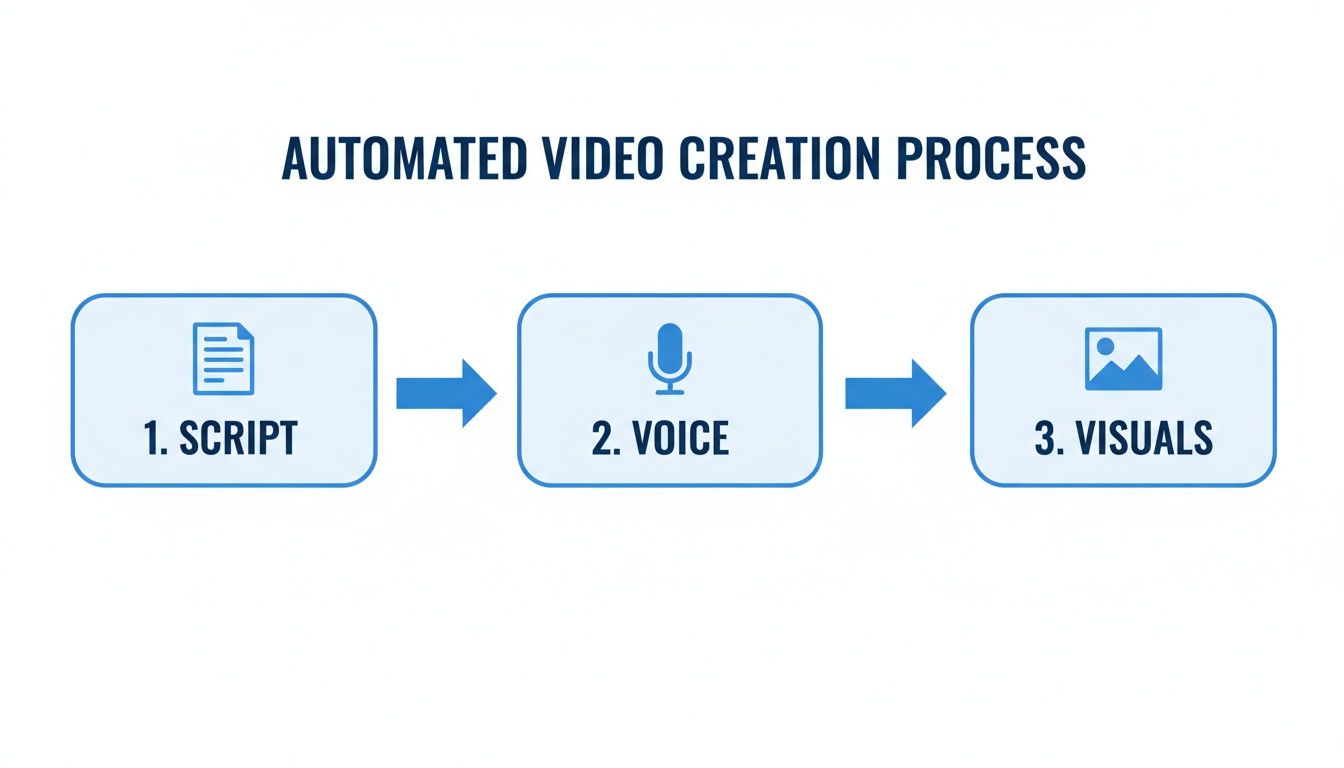
It’s all about transforming words into sight and sound, with almost no heavy lifting on your part.
Step 1: Generate Ideas and Scripts
Every great video starts with a solid idea. But instead of getting stuck staring at a blank page, you can kick things off with a simple prompt. Just tell the AI what you want to talk about, and it will generate a complete script that's already optimized for short-form video.
For instance, a prompt like, "a 45-second video about the surprising history of coffee," is all it takes. The AI spits out a script with a hook to grab attention, a snappy body, and a clear call-to-action. It knows the right pacing to keep people from scrolling, building a winning structure right from the start.
Writer's block is officially a thing of the past.
Step 2: Select a Voice and Tone
With your script locked in, it’s time to give it a voice. This is where you inject personality and set the mood. Automated platforms come with a huge library of AI voices—different genders, ages, accents, you name it.
Think about who you're talking to and what you want them to feel:
- Upbeat and Energetic: A classic American accent is perfect for a product demo or some motivational content.
- Calm and Authoritative: A British accent can add a layer of credibility to educational or historical topics.
- Friendly and Relatable: A more conversational tone is great for storytelling or building your personal brand.
Choosing the right voice is what makes your video feel genuine. It’s the difference between a robot reading a script and a compelling story that connects with your audience.
Step 3: Assemble the Visuals
Now, let's make it look good. The AI reads your script line by line and automatically pulls in relevant stock footage or generates unique images to match what's being said. You still have all the creative control.
Want a specific vibe? Just pick a style to match your brand:
- Cinematic: Gives you that dramatic, high-production look.
- Anime: Perfect for stylized storytelling or hitting a niche audience.
- Photorealistic: For when you need a grounded, real-world feel.
This completely eliminates the hours you'd normally waste hunting for the right clips. The system basically becomes your video editor, syncing every visual perfectly with the voiceover.
Being able to instantly generate and swap out visuals for every single scene is a massive advantage. It means you can A/B test different creative ideas without the time and expense of a traditional video shoot.
Step 4: Enhance with Captions and Music
On platforms like TikTok and Instagram, you have to assume people are watching with the sound off. That's why animated captions aren't just a nice-to-have; they're essential.
Automated tools add dynamic, word-by-word captions that are proven to keep eyes glued to the screen. You can also toss in some background music to set the mood or drop in emojis to make key points pop. It's these little layers of polish that make your content stand out in a crowded feed.
Step 5: Finalize and Export Your Video
With all the pieces in place, give your video a final once-over. If a scene feels off, you can regenerate it or even upload your own clip with a single click.
Once it looks good, export it in the perfect aspect ratio for TikTok, Reels, or Shorts. You're done.
Of course, creating the video is just half the battle. If you want to really learn how to get it in front of people, there are fantastic guides on promoting content on TikTok and other short-form platforms. Now you have an assembly line for creating endless content to test and dominate every channel.
Real-World Examples of Automated Content
Theory and workflows are great, but seeing is believing. The real "aha!" moment with automatic content creation comes when you see how it solves actual problems for real people. So, let’s move from the how to the what and walk through three different scenarios where automation is a total game-changer.
We'll look at a solo creator hungry for speed, an e-commerce brand desperate for cost savings, and a marketing agency that needs to scale—fast. These aren't futuristic ideas; this is what's happening right now.
Use Case 1: The Solo Creator Testing New Niches
Picture a creator wanting to launch a "faceless" YouTube channel about history. The big question is, what will pop? Ancient Rome? World War II? The Renaissance? Guessing wrong means sinking weeks into videos that go nowhere.
This is a perfect job for automation. Instead of grinding for days on a single video, our creator can pump out 10 to 15 high-quality Shorts every single week.
- Input: They feed the system simple prompts like, "Make a 60-second video on the fall of the Aztec Empire" or "Explain the key events of the Space Race."
- Process: The AI gets to work, generating a script, finding a deep, authoritative voiceover, and pulling together relevant historical footage and images. It then slaps on some dynamic captions to keep scrollers hooked.
- Outcome: The creator can blitz the algorithm with content, testing a dozen topics in the time it would've taken to make one manually. They can see what gets traction, ditch what doesn't, and double down on the winners. It’s all about accelerating growth without burning out.
Automation transforms content creation from a high-stakes gamble into a series of low-cost experiments. This allows creators to follow the data, not just their gut feelings, to find a winning formula.
Use Case 2: The E-Commerce Brand Showcasing Products
Now, let's think about an online shop selling artisanal coffee. To stay relevant, they need a steady diet of Instagram Reels and TikToks showing off new beans, teaching brewing techniques, and telling their brand story. The problem? A pro video shoot for every new product is way too expensive and slow.
By bringing in automatic content creation, the brand can build an entire library of product videos without ever picking up a camera. They can create tons of variations to keep their feed fresh. We're already seeing this in other areas, where tools like AI press release generators are completely changing the content game.
Here’s what their process looks like:
- Scripting: They use AI to spin up scripts for quick videos like "3 Mistakes to Avoid When Making French Press Coffee" or "Meet Our New Ethiopian Yirgacheffe Bean."
- Visuals: They upload their own product photos. The AI then mixes these with slick stock footage of coffee pouring and cozy cafe vibes.
- Branding: A friendly, upbeat voiceover is selected, and the brand’s logo and colors are automatically baked into the captions and on-screen graphics.
The result? A constant stream of on-brand, professional-looking videos for a tiny fraction of the cost. Their marketing team can now post daily, run targeted ads, and turn social media views directly into sales.
Use Case 3: The Agency Scaling Client Content
Last up, a marketing agency juggling social media for five completely different clients: a tech startup, a local restaurant, a fashion brand, a fitness coach, and a real estate agent. Each one needs at least three short-form videos a week. That’s 60+ unique videos every month.
Trying to handle that volume with a traditional video team would absolutely kill their profit margins. Instead, the agency uses automation as a force multiplier, letting a single social media manager do the work of a whole team.
They set up a unique profile for each client, locking in their brand voice, visual style, and target audience. The manager then spends just a few hours a week generating batches of videos and making small tweaks. This system lets the agency scale its client base massively without having to scale its payroll, leading to bigger profits and happier clients.
Best Practices for Authentic AI-Generated Videos
Let's address the elephant in the room. The biggest fear with automatic content creation is pretty simple: Will my videos sound like they were made by a robot?
It’s a totally valid concern. Nobody wants to churn out generic, soulless content that makes viewers immediately scroll away. The goal is to connect with people, not just fill a content calendar.
Here’s the thing: authenticity isn't something you sacrifice for automation. It’s something you intentionally build into your workflow. When you get it right, AI stops feeling like a machine and starts acting more like a creative partner that executes your vision at incredible speed.
The secret is to always remember that you are the director. AI handles the grunt work, but you guide the creative choices. By focusing on a few key areas, you can make sure every video feels genuine, fits your brand, and builds a real connection with your audience.
Refine Scripts with Your Human Touch
AI is a fantastic starting point for scripting. It can whip up a well-structured draft with a strong hook and clear talking points in seconds, saving you hours of staring at a blank page. But that first draft is just that—a starting point.
To make it truly yours, you have to inject your own voice. Tweak the phrasing so it sounds like something you’d actually say. Drop in a personal story, an inside joke, or a specific opinion that only you have. It’s these small, human touches that make content memorable.
Think of the AI script as a solid skeleton. Your job is to add the muscle, personality, and heart that bring it to life. This hybrid approach—AI's speed plus your creative oversight—is the key to producing authentic content at scale.
Select Voiceovers That Match Your Brand
For faceless content especially, the voiceover is the soul of your video. The wrong voice can make your content feel instantly off, cheap, or unprofessional. Thankfully, modern text-to-speech tech gives you a massive library of voices, accents, and tones, so you have precise control.
Before you pick one, ask yourself a few questions:
- Who am I talking to? A younger audience might vibe with a casual, energetic tone, while a B2B audience might prefer a voice that sounds more authoritative.
- What’s the video's mood? A historical explainer needs a calm, measured voice. A product promo probably needs something upbeat and enthusiastic.
- What’s my brand identity? The voice you choose should feel like a natural extension of your brand—whether it's playful, sophisticated, or trustworthy.
Don't just pick the first voice that sounds okay. Spend five minutes testing a few different options. You'd be surprised how much this one choice impacts the way your audience perceives your content.
Customize Visuals with Your Own Assets
While AI does a great job pulling relevant stock footage, the fastest way to make your videos stand out is to use your own visuals. Most creation platforms let you upload your own images, video clips, b-roll, and brand assets like logos.
Adding these custom elements instantly shatters that "stock footage" feeling and grounds the video in your world. This is a game-changer for businesses wanting to showcase their products or for creators trying to build a recognizable visual style.
For example, a clothing brand can mix AI-generated lifestyle scenes with its own high-quality product shots. This combo gives the video both an emotional hook and a tangible, real-world connection to the brand. It’s a simple step that makes your content feel way more credible and unique.
By actively refining scripts, carefully choosing voices, and customizing visuals, you ensure your automated workflow produces content that is not just efficient but deeply and genuinely you.
How to Measure and Optimize Your Video Strategy
Making content is just the start; understanding how it performs is what really sparks growth. With automatic content creation, you’re not just making videos faster—you’re building a system to test, measure, and improve on the fly. This flips your strategy from a guessing game into a data-driven machine.
But what should you actually be tracking? For short-form video on platforms like TikTok and Reels, a few key metrics tell you almost everything you need to know. Focusing on the right numbers is the difference between knowing what’s working and what’s a waste of time.
Key Performance Indicators for Short-Form Video
To get this right, you have to look past simple view counts. The real gold is buried in viewer behavior.
Here are the top metrics you should be watching like a hawk:
- Watch Time: This is the total amount of time people have spent watching your video. Algorithms on YouTube Shorts and TikTok absolutely love videos that keep people on their apps longer, so this one is huge.
- Audience Retention: This metric is your truth-teller. It shows you the exact percentage of viewers still watching at any point in your video. See a massive drop-off in the first three seconds? That’s a weak hook, and you know exactly what to fix.
- Engagement Rate: We’re talking likes, comments, shares, and saves. This is a direct signal of how much your content connects with your audience. You can get into the nitty-gritty with our guide on how to calculate your TikTok engagement rate.
Tracking these KPIs helps you pinpoint your winning videos, so you can stop guessing and make more of what your audience actually wants to see.
Using Automation for Rapid A/B Testing
This is where your automated workflow becomes a superpower. Instead of spending days creating one video, you can spin up multiple variations in minutes to test specific elements. This is called A/B testing, and it’s how you systematically figure out what performs best.
For instance, you could create three versions of the same video, but each with a different opening hook:
- Version A: Kicks off with a question.
- Version B: Starts with a shocking statistic.
- Version C: Leads with a bold, controversial statement.
Publish all three, then look at their audience retention graphs. The data will tell you exactly which hook is best at stopping the scroll. You can run the same play to test different visuals, calls-to-action, or even voiceover styles.
This continuous loop of generating, testing, and refining your videos based on real-time data is the core of a modern content strategy. It allows for constant experimentation without needing a large production team.
This whole approach is fueled by the rise of content intelligence—AI systems that analyze performance data to tell you what to create next. The global content intelligence market was valued between USD 2.04–3.31 billion in the mid-2020s and is set to explode, directly connecting analytics to creative ideas. You can learn more about the growth of the content intelligence market on fortunebusinessinsights.com. This means automation isn’t just about making videos faster anymore; it’s about making smarter videos that actually perform.
Common Questions About Automatic Content Creation
Jumping into automatic content creation is exciting, but it's smart to ask a few questions first. This space moves fast, so it’s important to get a real sense of what these tools can and can’t do. Let's tackle some of the most common things people wonder about.
We'll cover the big ones: authenticity, how hard it is to get started, and whether your stuff will just look like everyone else's. The goal is to get you comfortable enough to start playing with these tools and see how they can fit into your own workflow.
Can I Use My Own Voice for the Videos?
Yes, you absolutely can—and you should! The best platforms know that your voice is a huge part of your brand. They're built to make sure your audio feels authentic and personal.
You’ve got two great options here:
- Direct Upload: The most straightforward way. Just record your voiceover like you normally would, and upload the audio file. The tool will handle syncing it up with the visuals.
- Voice Cloning: This is where it gets really cool. Some tools let you create an AI clone of your own voice. You record a short audio sample, and the AI learns to replicate it. After that, you can type any script and have it read in a synthetic voice that sounds just like you.
This means you never have to settle for a generic, robotic narrator. Your content can always sound exactly like you.
Will My Videos Look the Same as Everyone Else's?
That’s a big fear, but nope—your videos will only look generic if you let them. Think of the AI as your production assistant, not the creative director. You're still the one calling the shots.
You can tweak just about every part of the video to match your unique style. Upload your own logos, brand colors, images, and even video clips to mix in with the AI-generated scenes. You can also customize the fonts, colors, and animations for your captions to nail your brand's look.
The trick is to see automatic content creation as a team effort. The AI does the heavy lifting, but it's your creative decisions and custom assets that make the final video truly yours and help it pop in a busy feed.
Is Automatic Content Creation Difficult to Learn?
Not at all. In fact, one of their biggest selling points is how easy they are to use. These tools were designed to skip the steep learning curve that comes with traditional video editing software.
Forget about confusing timelines and a million technical settings. You'll be working with simple text prompts and click-and-drag menus. Most people can create their first polished, high-quality video just a few minutes after signing up, even with zero video editing experience. The whole process is built for speed and simplicity.
Ready to stop grinding and start creating at scale? With ClipShort, you can turn a simple idea into a dozen viral-ready videos in minutes. Join tens of thousands of creators who are automating their short-form content production and growing their channels faster than ever before. Start creating your first video with ClipShort today.